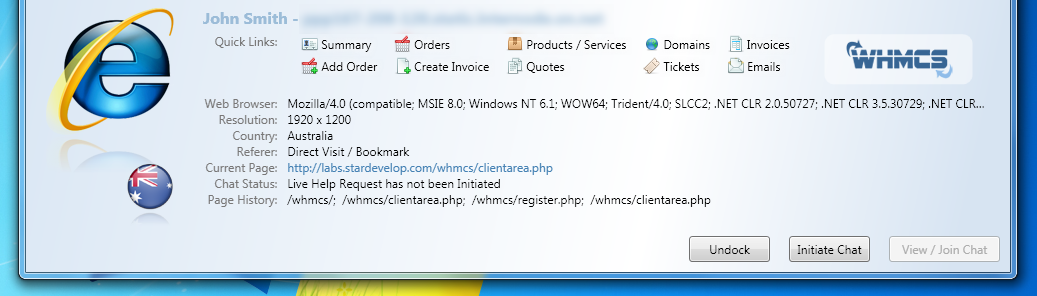
Are you communicating directly with your clients in real-time? Do you know how they browse your website? If you already have a live chat solution, are chat logs automatically saved under your client’s account?
Our Live Chat & Visitor Tracking Addon includes all these features as standard, along with direct links for your WHMCS billing system from the chat window. Offering a Live Chat for sales questions can have a huge impact on turning a potential customer, into a sale.

In recent case studies, LunarPages.com, a World-Wide Hosting Provider, records a 15% increase in sales due to introducing a Live Chat solution. While Virgin Atlantic records:
"This year we had our first ever Live Chat Millionaire, a chat agent who was the first to personally achieve $1.5m in sales via chat on our website, which was achieved in record time, 20% less time than a typical telephone agent." - John Giddings, General Manager, Virgin Atlantic Contact Centres
One key to this, is knowing exactly when and where to place your online chat button. Reported by InternetRetrailer.com, a good practice is placing the Live Chat button on a Product Overview page rather than directly on the main page. The theory here is, your potential customer is interested and if they've been unable to find the answer they need to close the sale you've presented them the opportunity to engage someone personally to help close the sale.
WHMCS offers the most comprehensive Live Chat add-on to your website, it includes Simple Integration, Real-time Visitor Statistics, Browsing Footprint tracking, all fully integrated with your billing system from just $6.96/mo.
Our latest video tutorial shows you how to install and configure all this in under 5 minutes. We'd be keen to hear your experiences with live chat, and how have your visitors responded to it. Where have you found the most effective live location for the live chat buttons? Let us know!
Integrate our Live Chat add-on and see how you can turn visitors into customers.