Growing a business with limited resources is tough, but the right marketing tools can make it much easier. They help you save time, avoid doing the same tasks over and over, and keep everything in one place so you're not constantly jumping between different apps.
Think about all the things that go into marketing: setting up a website, posting on social media, sending emails to customers, and keeping track of projects. Doing all of that manually takes a lot of time. But with the right tools, you can schedule posts ahead of time, send emails automatically, track what's working, and stay organized without the stress.
Instead of spending hours on small tasks, these tools let you focus on what really matters, growing your business. We've put together some of the best options to help make your marketing easier and more efficient.
- SocialBee - An AI-powered social media management tool that helps businesses create, schedule, share posts, engage, collaborate, and track performance. Pricing: Starts at $29/month, with a 14-day free trial.
- XOVI - An all-in-one SEO tool for keyword tracking, competition analysis, and content optimization. Pricing: Starts at EUR 99/month, with a 14-day free trial.
- Sitejet - An affordable and easy-to-use website builder, offering customizable templates and built-in hosting. Pricing: Starts at $19/month, with a 14-day free trial.
- Mailchimp - An email marketing platform that lets you schedule emails, target specific groups of customers, and test different messages to see what works best. Pricing: Free plan available, paid plans start at $13/month.
- HubSpot - A CRM tool that helps businesses manage leads, automatically send email follow-ups, schedule email campaigns, trigger messages based on social interactions, and track customer interactions. Pricing: Free CRM available, paid plans start at $20/month.
- Asana - A project management tool for organizing tasks, tracking progress, and setting up tasks to run automatically. Pricing: Free plan available, paid plans start at $13.49/user/month.
- BuzzSumo - A content analytics tool for tracking trends, monitoring competitors, and discovering influencers. Pricing: Starts at $199/month, with a 7-day free trial.
- Grammarly Business - A tool that helps you check and improve your writing by correcting grammar, spelling, and style mistakes. Pricing: Free plan available, business plans start at $30/member/month.
- Canva - A graphic design tool with drag-and-drop editing, templates, and branding tools. Pricing: Free plan available, paid plans start at $15/month.
- SimpleTexting - An SMS marketing tool for sending mass texts, automatically sending out responses to incoming messages and engaging in two-way messaging. Pricing: Starts at $29/month for 500 credits, with a 14-day free trial.
For small businesses especially, these tools make running digital marketing campaigns easier without expending more resources than is realistic. Not only that, but they automate processes and track performance, so companies can save time and improve their strategies based on real data.
Here are nine digital marketing tool types every small business should use:
- Email marketing tools
- CRM tools
- Social media marketing tools
- SEO tools
- Project management tools
- CMS tools
- Analytics tools
- Design tools
- SMS marketing tools
These tools also let you create pages where people can sign up for your email list, which helps you grow your audience.
One example of an email marketing tool is Mailchimp. Learn more about what it can do, along with its pros and cons, in our review below.
These tools can also send reminders to check in with customers, automate follow-up emails, and organize customer data so businesses can offer better service and support.
A CRM tool worth mentioning and we'll discuss later in this article is HubSpot.
Social media marketing tools make running multiple accounts on various platforms easier than ever. They allow you to create, schedule, and post content, as well as analyze it, all from one place. You can even engage with your followers and monitor interactions with the right tool.
One of the best social media marketing tools out there is SocialBee, which we'll look into in more detail in our review later in this article.
With so much competition online, these tools make it easier to improve website visibility and attract more visitors. XOVI is an SEO tool you'll learn all about in this article.
One of the most popular project management tools, and one we've reviewed later in this article, is Asana.
Whether you're running a blog, an online store, or a business website, a CMS makes it simple to make changes, improve search rankings, and customize the site using ready-made templates and add-on features.
Sitejet is a CMS tool with lots of helpful features for building successful websites. We've listed its features, pros, and cons below.
BuzzSumo is an analytics tool you'll learn more about soon in this article.
Canva is one of the most popular design tools out there, but if you don't know much about it, we'll give you a full overview in our review below.
Many tools let you schedule messages in advance, send texts to specific groups of people, and personalize content, making it easier to keep customers engaged and encourage sales.
If you want to start using an SMS marketing tool stay tuned to learn more about SimpleTexting.
Here are the ten best marketing tools for small businesses:
- SocialBee
- XOVI
- Sitejet
- MailChimp
- HubSpot
- Asana
- BuzzSumo
- Grammarly Business
- Canva
- SimpleTexting
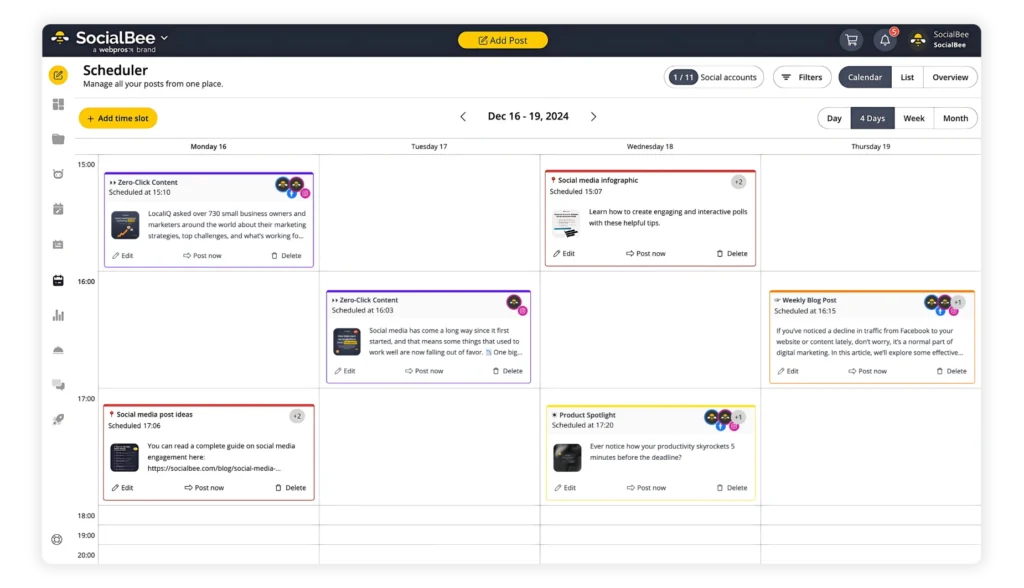
Plus, it helps you work more efficiently with a small team by cutting out the repetitive, manual tasks of switching between platforms to provide feedback and approve posts.
Speaking of time-consuming work, with SocialBee, you can just schedule your posts, and they'll publish automatically without needing to log in to each platform every time you have to share a new post.
Features
- Social media calendar: Plan and visualize your entire content strategy in a clear, interactive calendar.
- Integrated design tools: Create visually stunning posts with the built-in Canva integration.
- AI-powered post generator: Generate compelling captions in seconds with AI-assisted writing.
- Content categorization: Organize content into categories, which work like folders, and create specific schedules for each category while also ensuring a diverse content mix.
- RSS feed integration: Automatically pull new content from your favorite blogs or websites and share curated posts with your audience without manually creating them.
- Post customization: Adjust text, images, and formats for different social platforms easily either manually or with the help of AI-generated variations.
- Automated hashtag generation: Get instant hashtag suggestions based on your content.
- Post recycling and expiration: Organize content into evergreen categories to keep posts circulating on a loop, choose how many times a post should be reshared, or schedule posts to stop sharing after a specific date.
- Workspaces and collaboration: Keep everything organized for multiple businesses with separate workspaces, collaborate with your team, share feedback, and approve content to ensure it's ready to go before posting.
- Link customization: Shorten links and add UTM tracking with multiple URL shortener integrations.
- Account growth and performance analysis: Track page growth, post engagement, and more to refine your social media strategy.
- Posting time recommendations: Schedule your content at the best times for engagement with SocialBee's posting recommendations based on past performance.
- Social inbox: Respond to comments, mentions, and messages from one centralized inbox.
- Makes scheduling for any platform possible through mobile reminders with Universal Posting, something many other social media tools don't support.
- Great value for many as plans are on the more affordable side.
- The customer support is fast and helpful.
- There are new feature releases each month.
- There is no limit on the number of images or posts you can generate with AI.
- Slight learning curve at the beginning.
- Starts at $29/month. Offers a 14-day free trial.
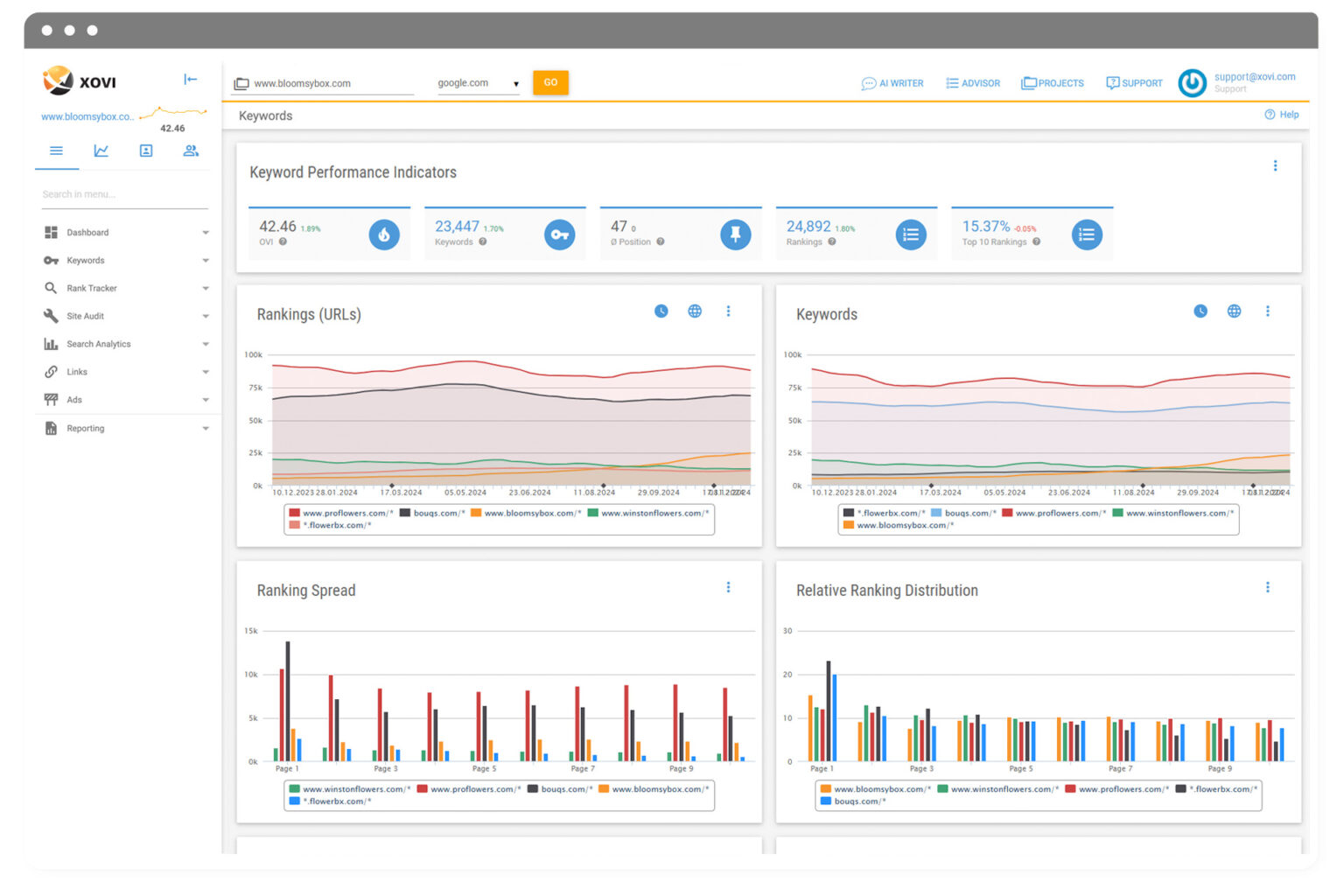
With unlimited audits and detailed reports, you can spot areas for improvement and keep track of your progress. Whether you're managing a website, running an online store, or handling multiple client projects, XOVI gives you the tools to boost visibility and reach more people.
Features
- Keywords: Discover promising keywords with all the relevant data. Save them in the keyword planner and find out which keywords people use to find you and your competitors.
- Site audit: Optimize the technical and content-related aspects of your website. Increase the relevance of your texts with text analysis.
- Rank tracker: Monitor important keywords on all your devices and react to ranking changes in real time.
- Backlinks: Keep track of your link profile and optimize it by comparing links with those of competitors.
- Disavow toxic links: Analyze your link profile and remove harmful links to prevent or resolve penalties and recover lost rankings.
- Customized reporting: Create tailored SEO reports for your customers or superiors, designed to match your company's layout.
- Search analytics: Link your XOVI suite to Google Analytics, Search Console, or Matomo to get data reports and analyze them in one place.
- Search engine ads: Analyze and understand your competitors' Google Ad campaigns. Uncover the keywords they target and what drives their success.
- Advisor: Get personalized SEO tasks with step-by-step guidance, making it easier to improve your rankings without deep SEO expertise.
- AI writer: Create SEO-optimized content with AI for better search rankings and increased organic traffic.
- It's a one-stop-shop for SEO given its comprehensive toolkit.
- XOVI doesn't limit the number of projects you can run or competitors you can analyze, no matter the plan you purchase.
- The platform provides white-label reports tailored to your brand, making it a great option for agencies needing professional client reporting.
- Offers a small number of integrations with third-party marketing tools.
- Starts at EUR 99.00/month. Offers a 14-day free trial.
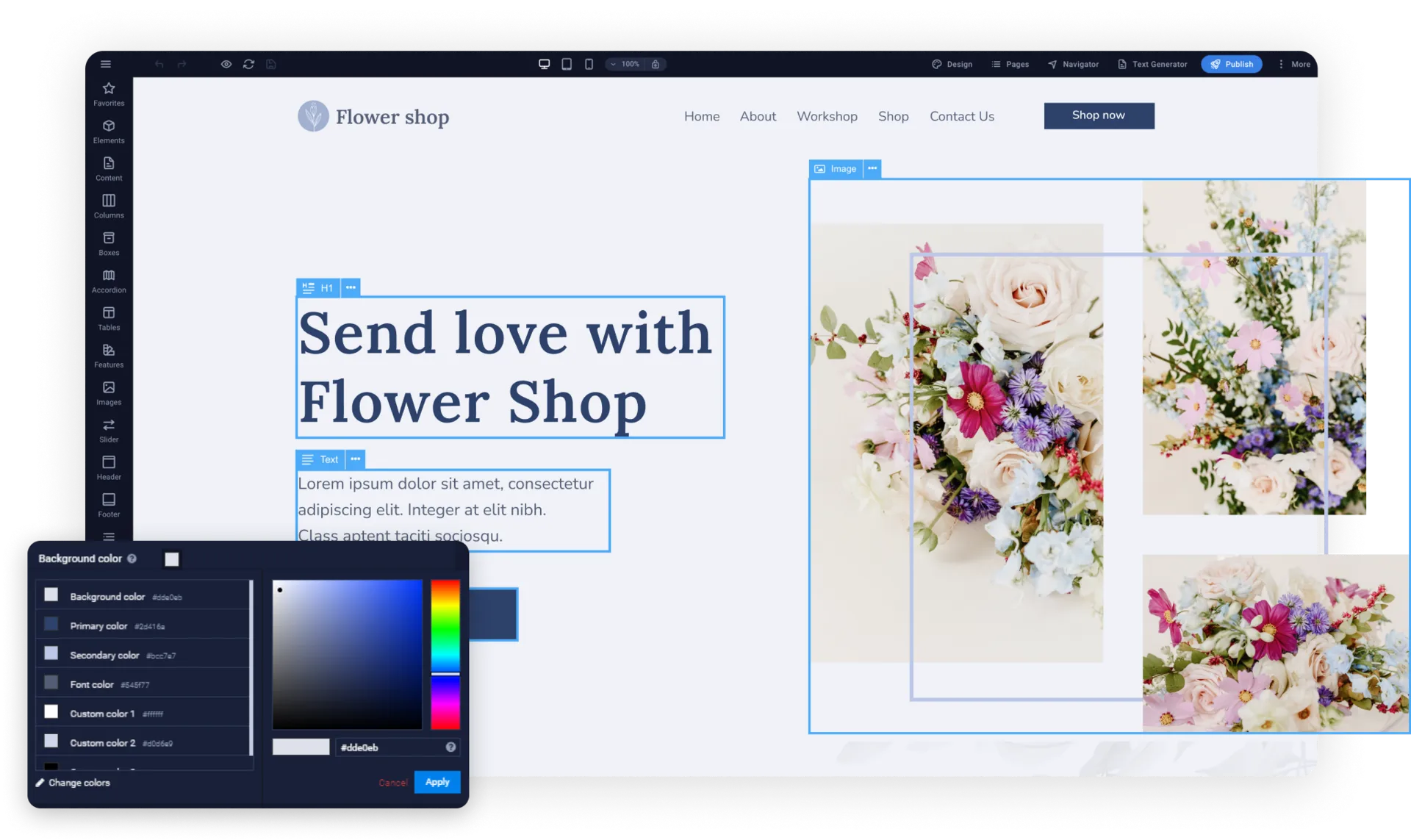
The AI text generator helps with content creation, while SEO-friendly features support better rankings. Users can add online stores with Ecwid, collaborate with clients through a customer portal, and enjoy secure hosting with SSL, CDN, and automated backups.
Sitejet offers small businesses the flexibility and efficiency needed to build high-quality websites faster.
Features
- Website builder: Create and manage websites with a professional CMS optimized for speed and flexibility.
- Template pool: Access 140+ customizable website templates and edit them within the CMS.
- Full design flexibility: Modify HTML, (S)CSS, and JavaScript for complete creative control.
- Responsive design: Ensure every site adapts perfectly to all devices.
- Integrated extensions: Add eCommerce, blogs, and dynamic content seamlessly.
- AI text generator: Generate website copy instantly and embed it where needed.
- Image editing: Edit images directly within the platform for easier task management.
- SEO settings: Optimize metadata, images, and page speed for better search rankings.
- Advisor: Get personalized SEO tasks with step-by-step guidance, making it easier to improve your rankings without deep SEO expertise.
- Preview mode: See real-time previews of your site on different devices and browsers.
- Hosting and security: Benefit from SSL, CDN, automated backups, and DDoS protection.
- User-friendly dashboard with a modern design.
- It offers great value for money.
- Flexible so it can be useful for both beginners and people with coding experience.
- It doesn't offer as many integrations as competitors.
- Starts at $19/month. Offers a 14-day free trial.
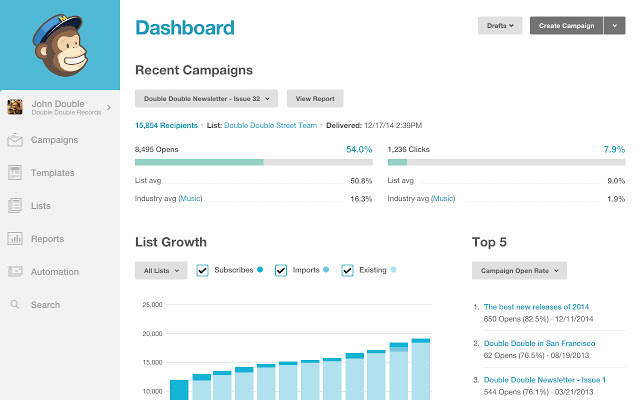
With MailChimp, you can choose from ready-made email templates, divide your email list into different groups, and even set up automatic emails that send when certain things happen, like when someone buys a product or signs up for your newsletter.
Features
- Email builder: Create professional and engaging emails with an easy-to-use editor.
- Email templates: Save time with pre-designed email templates for different campaign types.
- A/B testing: Improve email performance by testing your subject lines, content, and send times.
- Customer journey builder: Schedule email sequences based on customer actions such as abandoned cart reminders or welcome emails to new subscribers.
- Dynamic content: Customize emails automatically according to user behavior and preferences.
- Segmentation: Filter and target specific audience groups based on demographics, signup source, purchase history, and more, for more relevant messaging.
- Behavioral targeting: Send personalized messages triggered by customer interactions such as clicking on a specific link or opening a certain website page.
- Marketing CRM: Build stronger customer relationships and manage your data efficiently by storing contact information, tracking interactions (like email opens, clicks, and purchases), and organizing contacts with tags, segments, and custom fields.
- Send time optimization: Identify the best time to send emails for higher engagement.
- Marketing reports: Track campaign performance with detailed analytics and insights.
- Offers a free plan which is amazing for businesses just starting out.
- Has some of the best email templates.
- It's very easy to use.
- The free plan doesn't let you schedule emails.
- The free plan only benefits from customer support for the first 30 days.
- Offers a free plan. Paid plans start at $13/month.
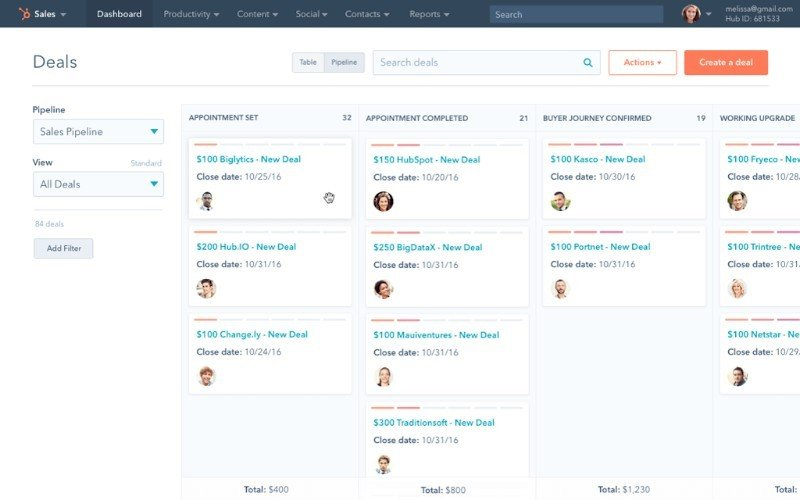
With HubSpot's automation tools, businesses can set up email campaigns, assign tasks, and track communication without extra manual effort. HubSpot also provides reports and analytics to help businesses understand customer behavior and improve their approach.
It integrates with various apps, allowing businesses to connect their marketing, sales, and support tools for a more organized and efficient workflow.
Features
- Contact, deal, and task management: Organize and track interactions with contacts, manage sales deals, and stay on top of tasks for better follow-ups.
- Email tracking and engagement notifications: Get notified when contacts open your emails, helping you follow up at the right time.
- Email templates and scheduling: Save time with reusable email templates and schedule emails to reach customers when they're most likely to engage.
- Document sharing: Share important files with contacts and track when they view them.
- Meeting scheduling: Let contacts book meetings based on your availability, avoiding unnecessary back-and-forth.
- Live chat: Capture leads by answering your website visitors' questions in real time.
- Sales quotes: Create professional sales quotes and send them directly from the CRM.
- Customizable CRM: Adjust properties, layouts, and views to fit your business needs.
- Great resources to help you use the CRM features.
- Lots of useful integrations.
- Free access to CRM features
- Many functionalities require add-ons that add up.
- The jump from Starter to Professional pricing is steep, and it may be high for smaller businesses.
- HubSpot CRM is free, but access to premium features is granted with the purchase of premium HubSpot plans. Paid plans start at $20/month.

With features like timelines, automation, and integrations with other apps, Asana helps businesses keep projects on track. Teams can communicate within tasks, share files, and monitor project updates in real time. Whether managing small tasks or complex projects, Asana provides a clear overview of priorities and deadlines.
Because of its easy-to-use design, it's a fantastic option for companies trying to increase productivity and maintain efficiency.
Features
- Tasks and projects: Break work into smaller tasks, assign owners, set deadlines, and manage everything in a shared workspace.
- Project views: Organize work using lists, calendars, Kanban boards, Gantt charts, or timelines for better visualization.
- Custom fields and tags: Add labels to tasks for easy sorting, filtering, and automated reporting.
- Time tracking: Measure time spent on tasks to improve planning and resource allocation.
- Status updates and reporting: Track progress with real-time data, automated updates, and reporting dashboards.
- Workflows and automation: Set up automated processes to reduce manual work and keep projects moving.
- Resource management: Plan timelines, balance workloads, and allocate resources effectively.
- Goals and portfolios: Align team efforts with company objectives and monitor connected projects in one place.
- Inbox and notifications: Get automatic updates on relevant tasks while filtering out unnecessary alerts.
- Mobile and desktop apps: Stay on top of tasks and projects from anywhere.
- The free version offers useful features for a small business.
- Has great automation features.
- Offers multiple views (list, calendar, Kanban, Gantt) to fit different workflows, making it easy to organize and track work.
- Without careful organization, tasks and updates can pile up, making it harder to navigate and prioritize work.
- It doesn't offer built in time tracking, only through integrations.
- Offers a free plan. Paid plans start at $13.49/user/month.
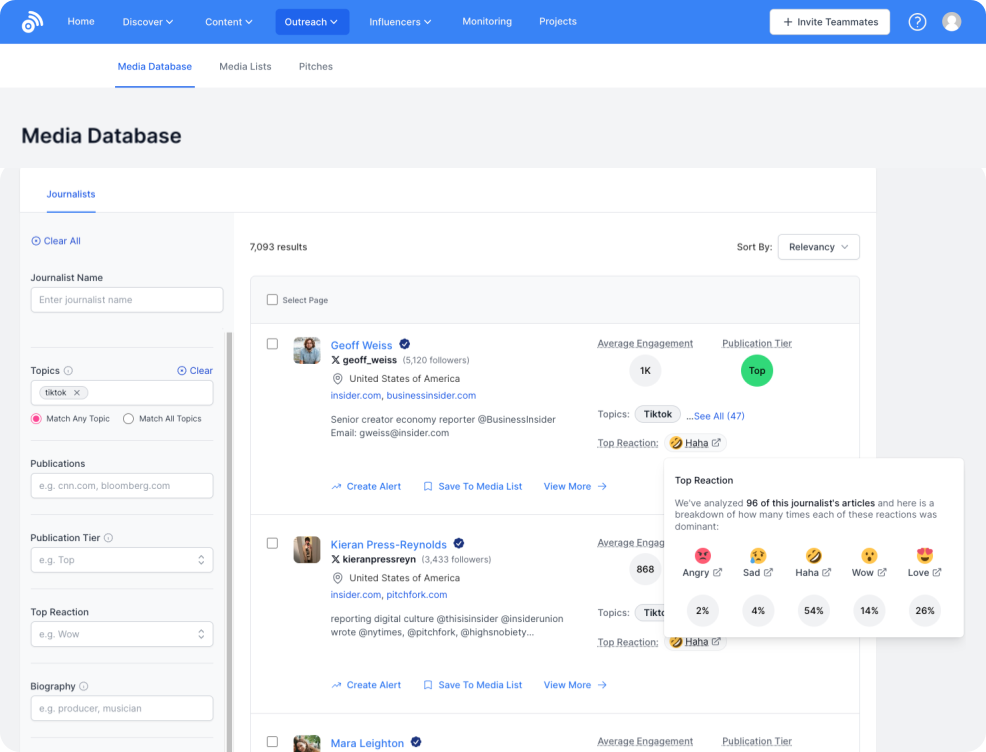
Its monitoring tools track brand mentions, industry updates, and competitor activity, keeping you informed with real-time alerts. The content discovery feature highlights trending topics and discussions, making it easy to find fresh ideas.
With content research, BuzzSumo scans billions of posts and articles to uncover insights that improve engagement. The influencer search tool helps businesses connect with credible voices who have real audience influence.
Features
- Monitoring: Keep track of brand mentions, competitor activity, and industry trends with custom alerts.
- Content discovery: Explore trending topics, discussions, and forums to generate fresh content ideas.
- Content research: Analyze millions of articles and social posts to find which content performs.
- Influencer search: Find creators and industry leaders from your niche that have high engagement rates on platforms like Instagram and X (formerly Twitter).
- Trend analysis: Identify emerging trends and understand audience interests before they peak.
- Backlink tracking: Monitor backlinks to see who is sharing and referencing your content.
- Engagement analytics: Measure social shares, reactions, and interactions to gauge content effectiveness.
- Competitor analysis: Compare content performance against competitors to refine your strategy.
- Content alerts: Get notified about important mentions, viral content, and shifts in industry conversations.
- Reporting tools: Generate data-driven reports to track content success and optimize future efforts.
- Easy to set up.
- Great for beginner blog writers who need topic ideas.
- BuzzSumo updates content and engagement data frequently, so you're always working with the most current information.
- Prices are on the higher side.
- There are limited alerts for media mentions and engagement depending on the plan.
- Starts at $199/month. Offers a 7-day free trial.
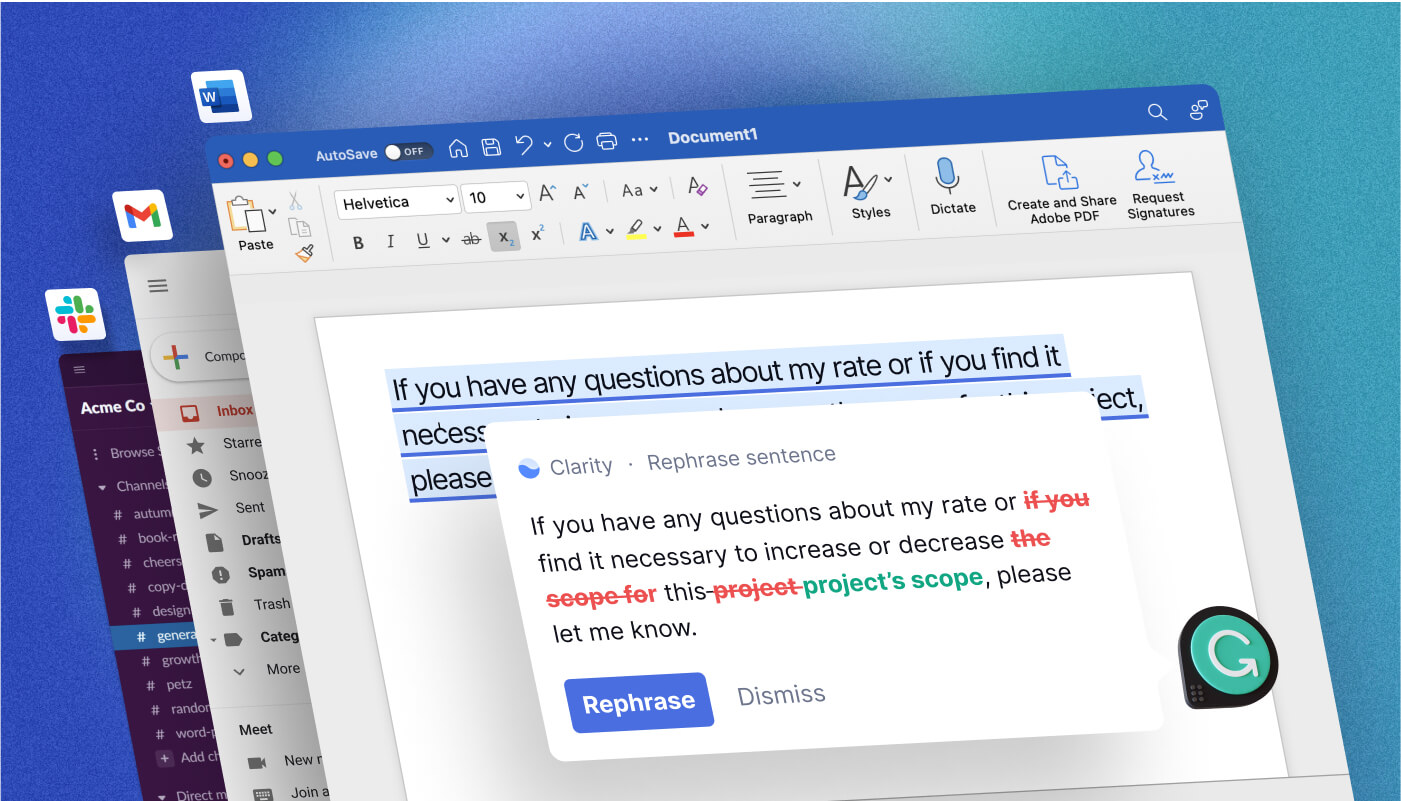
Grammarly Business also makes collaboration easier, allowing multiple users to refine content together. Its AI-powered tools improve readability and engagement, while the plagiarism checker ensures originality.
Plus, it works with tools like Google Docs, fitting right into existing workflows.
Features
- Generative AI: Quickly create first drafts, outlines, and more while maintaining your company's voice and style.
- Style guide: Upload and update your company's style guide so all content stays consistent and aligned with brand decisions.
- Brand tones: Define your brand's voice and let Grammarly provide tone suggestions to keep messaging on-brand.
- Knowledge share: Access important company information while writing, reducing the need to search through documents.
- Strategic suggestions: Get personalized feedback on what to include and emphasize to make content more effective.
- Citations checker: Make sure your citations are consistent throughout your document with Grammarly's edit suggestions based on current guidelines of your preferred citation style.
- AI checker: Check the percentage of AI-generated content in your text so you can go back and humanize it.
- Plagiarism detection: Run your text through a plagiarism check to make sure it's original and there's no involuntary similarities that could cause issues.
- Maintaining your brand voice in everything you write is a lot easier.
- Their chrome extension is handy because you can use it across documents and platforms
- The tool is very easy to use.
- Because the price is per user, costs can add up.
- Its writing suggestions need to be taken with a grain of salt sometimes, as it might lead to repetitive or robotic writing.
- Grammarly offers a free plan. Grammarly Pro, meant for businesses, starts at $30/member/month.
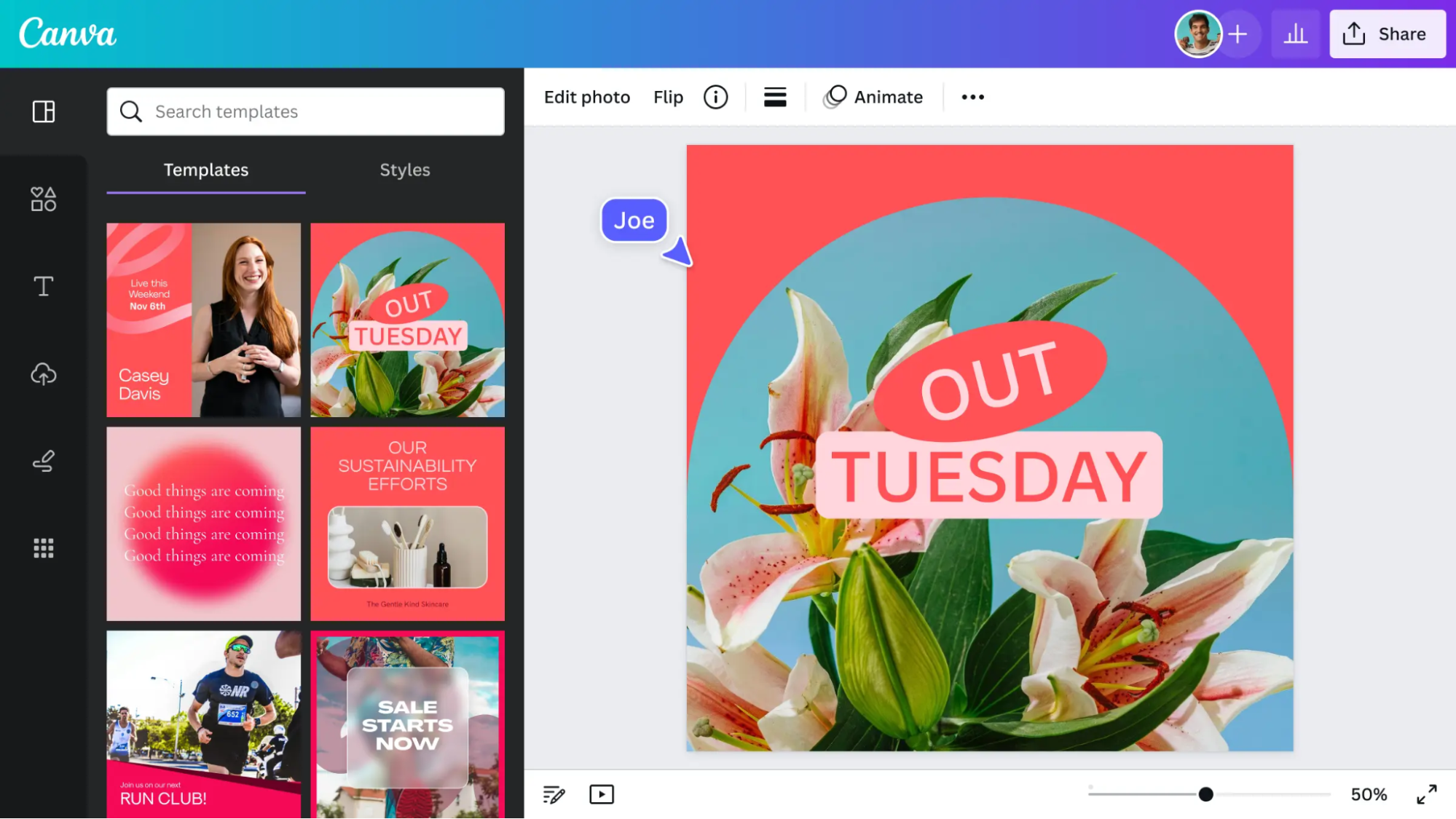
Canva provides access to over 100 million stock photos, videos, and audio elements, making it easy to create eye-catching content. AI-powered tools simplify design, while branding features help maintain consistency.
Features
- Drag-and-drop editor: Create and edit visuals without prior graphic design knowledge.
- Templates library: Gain access to thousands of design templates for social media, marketing materials, and more.
- Stock media: Choose from over 100 million stock photos, videos, and audio elements to enhance your designs.
- AI-powered design tools: Get smart design suggestions and automated features to speed up the creative process.
- Brand kit: Organize logos, fonts, brand colos, and more into brand kits to keep designs consistent.
- Collaboration tools: Work with team members and leave them feedback in real time on projects.
- Logo maker: Create professional logos quickly with customizable templates.
- Magic Resize: Instantly change the size of your designs to match different platforms and formats.
- Presentation mode: Turn designs into interactive presentations with transitions and animations.
- Print services: Get high-quality print versions of your Canva designs by ordering them from the platform.
- Very easy to learn to use for beginners.
- Creating designs is convenient in the mobile app.
- The template library is huge and varied.
- End results might look a bit generic.
- AI functionalities aren't very complex.
- Offers a free plan. Paid plans start at $15/month.
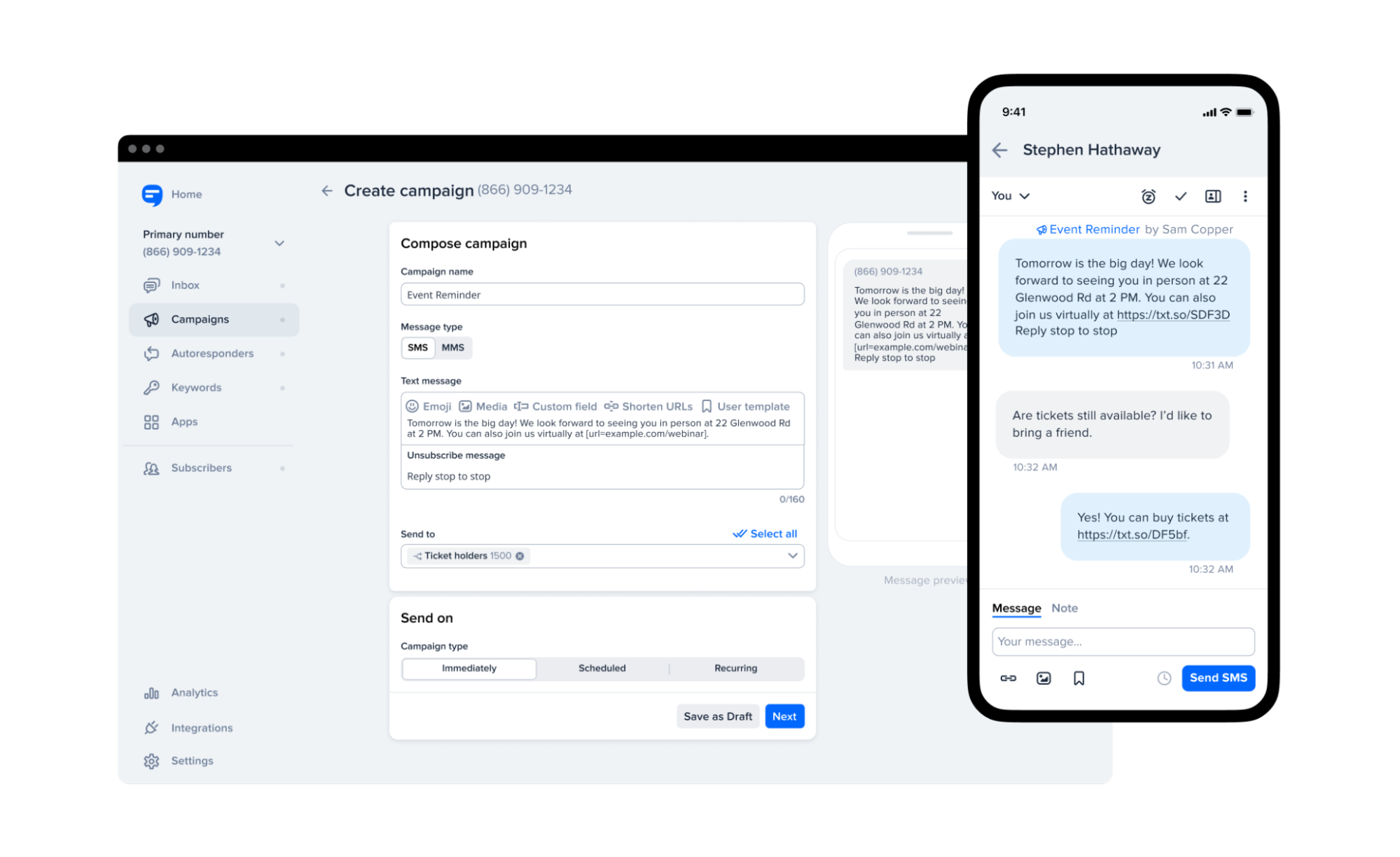
SimpleTexting also provides tools for building SMS lists, including text-to-join keywords and website pop-ups. Businesses can send promotional campaigns, appointment reminders, and customer support messages, all from one platform.
Features
- Build a list or add contacts: Import existing numbers or have users send a text or fill in a form to join your contact list.
- Send texts to large groups: Reach hundreds or thousands of contacts instantly with mass texting.
- Have two-way conversations: Use a dedicated business number to chat with customers and manage responses.
- Automated messaging: Set up drip campaigns, scheduled texts, recurring messages, and auto-replies.
- Personalized messages: Send texts that are relevant to each recipient by customizing them based on the data you collect.
- Team collaboration: Assign conversations, leave internal notes, and manage multiple numbers.
- MMS support: Send images, GIFs, and videos for more engaging messages.
- Link tracking & shortening: Shorten URLs and track clicks to measure engagement.
- Poll subscribers: Run interactive polls to gather feedback or engage your audience.
- AI Assist: Use AI to generate text message content and avoid writer's block.
- Features like text-to-join, web forms, and data collection make it easy to grow and manage an SMS subscriber list.
- Detailed training videos to get started with the tool.
- Responsive and helpful customer support to answer your questions.
- It doesn't have a CRM for you to manage your customers and leads.
- It's mainly made for the USA and Canada, so it might not work for global campaigns.
- Pricing based on usage, starts at $29/month for 500 credits. Offers a 14-day free trial.
Make sure the tool's easy to use, especially if you don't have a full marketing team. Most tools offer free trials, so it's worth testing a few before you decide.
SMS works well for direct, personal communication, while SEO helps people find you through search over time. A lot of small businesses use a mix of these to connect with their audience in different ways.
From your website to your social media channels, there's nothing that can't be improved with the help of marketing automation software and great analytics functionalities. SEO, SMS marketing, customer relationship management, and more are all at your fingertips with these ten amazing digital marketing tools.