Growing your website organically is the dream scenario, but it can become a reality easily with the help of the right SEO tools. From keyword research to content optimization and competitor analysis, the right tool will bring you to the top of Google search results in no time.
There are a lot of components that go into a good SEO strategy, and it can become overwhelming fast. In this article, we'll go through ten paid and free tools that can help rank your website. Let's look into their features, advantages, and disadvantages, so you can make an informed decision and start optimizing your online presence.
Short Summary
- XOVI - An all-in-one SEO tool that helps you track keywords, run competition analyses, and optimize your content. Pricing: Starts at EUR 99/month, with a 14-day free trial.
- Semrush - A complete marketing platform that helps you improve your SEO, content, ads, and competitor strategy. Pricing: Offers free SEO tools, paid plans start at $139.95/month.
- Ahrefs - An SEO tool focused on backlink analysis, keyword research, and tracking your site's search performance. Pricing: Offers free SEO tools, paid plans start at $129/month.
- AnswerThePublic - A keyword research tool that shows you what people are really asking online, helping you create content that answers their questions. Pricing: Offers a free tool, paid plans start at $6/month.
- HubSpot - HubSpot's SEO tools help you plan, optimize, and track your website content to improve search rankings, all within its content management platform. Pricing: There's a free plan. More advanced SEO features come with the Marketing Hub Professional plan at $880/month.
- BuzzSumo - A tool that helps you discover high-performing content, track keywords, and find backlink and content opportunities to improve your search visibility. Pricing: The Content Creation plan is $199/month, it comes with a 30-day free trial.
- SurferSEO - An SEO tool that helps you optimize content for better rankings by analyzing top-performing pages and giving real-time suggestions based on keyword usage, structure, and length. Pricing: Starts at $99/month.
- SEOquake - A free browser extension that instantly shows key SEO data for any webpage, helping you audit and analyze content directly in your browser. Pricing: Free.
- Exploding Topics - A trend discovery tool that helps you find fast-growing topics before they become widely known. Pricing: Offers free tools, paid plans start at $39/month.
- Ubersuggest - A free SEO tool that helps you grow your website traffic by giving you insights into keywords, content, and your competition. Pricing: Offers a free plan, paid plans start at $20/month.
What Are SEO Tools?
SEO tools help websites rank higher on search engines like Google. They suggest relevant keywords, track your site's performance, and provide tips to improve your content. They also analyze competitors and help you find opportunities to get links from other websites, making it easier for people to discover your site. Search engines are oversaturated with websites, as every business tries to become a relevant presence online. SEO tools are your shot at standing out among them and bringing audiences to your web pages.
What Features Should an SEO Tool Have?
A good SEO tool should have the following features: - Site health analysis
- Keyword research
- Rank tracking
- Competitor analysis
- Backlink tracking
- Content optimization suggestions
- SEO reporting
- Local SEO tools
- On-page SEO analysis
- Integration with other tools
1. Site Health Analysis
Site health analysis checks your website for technical issues that could hurt your search rankings. It looks for things like broken links, missing page titles, slow loading times, and other problems that make it harder for search engines to understand your site. By staying up to date with these problems, you can fix them in a timely manner and make sure they don't affect your rankings.
2. Keyword Research
You can find out what terms or phrases people use on Google to search for business-related content by conducting keyword research. You can use SEO tools to see how popular a keyword is and how difficult it is to rank for. This can help in the selection of appropriate keywords for your content, increasing your online visibility.
3. Rank Tracking
Rank tracking shows where your website appears in search engine results for specific keywords. It helps you see how well your content is performing and if your rankings go up or down over time. This makes it easier to measure what's working and what needs improvement in your SEO strategy.
4. Competitor Analysis
Competitor analysis allows you to check the performance of other websites in your niche. This means seeing what keywords they rank for, where they get their backlinks from, and what their volume of traffic is. Knowing what your competitors are doing will hold important lessons about what your own strategies should look like. 5. Backlink Tracking
Backlinks are those links from other websites that lead to your own site. They're important because search engines see them as a sign of trust. Backlink tracking shows you who is linking to you, how valuable those links are, and if you've lost or gained any. It also helps you find websites that might link to you in the future, or opportunities for backlink exchanges with others.
6. Content Optimization Suggestions
This feature reviews your web pages or blog posts and gives tips to make them more search-friendly. It might suggest using your keyword more, shortening paragraphs, adding images, or improving your title. Tools usually make recommendations by analyzing what your competition does and if it works or not, and suggesting you do what has been proven to work. Anything from your word count to the number of headings you use can determine your results in SERPs.
7. SEO Reporting
SEO reporting gives you a summary of how your website is doing. It usually includes rankings, traffic, technical issues, and keyword performance. Reports help you track progress over time and share your results with teammates or clients in a clear and simple way. 8. Local SEO Tools
If your business has a physical location, like a shop or office, or it serves a certain geographical area, local SEO tools help you appear in searches from people nearby. They make sure your business shows up in Google Maps, help you manage online reviews, and keep your contact info consistent across the web.
9. On-Page SEO Analysis
On-page SEO analysis checks individual pages on your website to make sure they are optimized for search engines. It looks at things like your title tags, meta tags, headings, images, and how often your keyword appears. It helps you fine-tune each page so it has a better chance of increasing your organic traffic.
10. Integration With Other Tools
Many SEO tools work with platforms you might already use, like Google Analytics or your website builder. These integrations let you see more data in one place, making it easier to track your SEO performance and manage your strategy without switching between apps. Top 10 SEO Tools For Your Website
With all the important features of a good SEO tool now explained, let's take an in-depth look at a few you should consider using for your own strategies. Here are ten of the best SEO tools for your website:
- XOVI
- Semrush
- Ahrefs
- AnswerThePublic
- HubSpot
- BuzzSumo
- SurferSEO
- SEOquake
- Exploding Topics
- Ubersuggest
1. XOVI - SEO Tool
XOVI is a complete SEO tool designed to help businesses, agencies, and freelancers improve their visibility on search engines. It includes tools for tracking keywords, analyzing competitors, and getting smart suggestions to improve your content, making SEO more manageable for everyone. 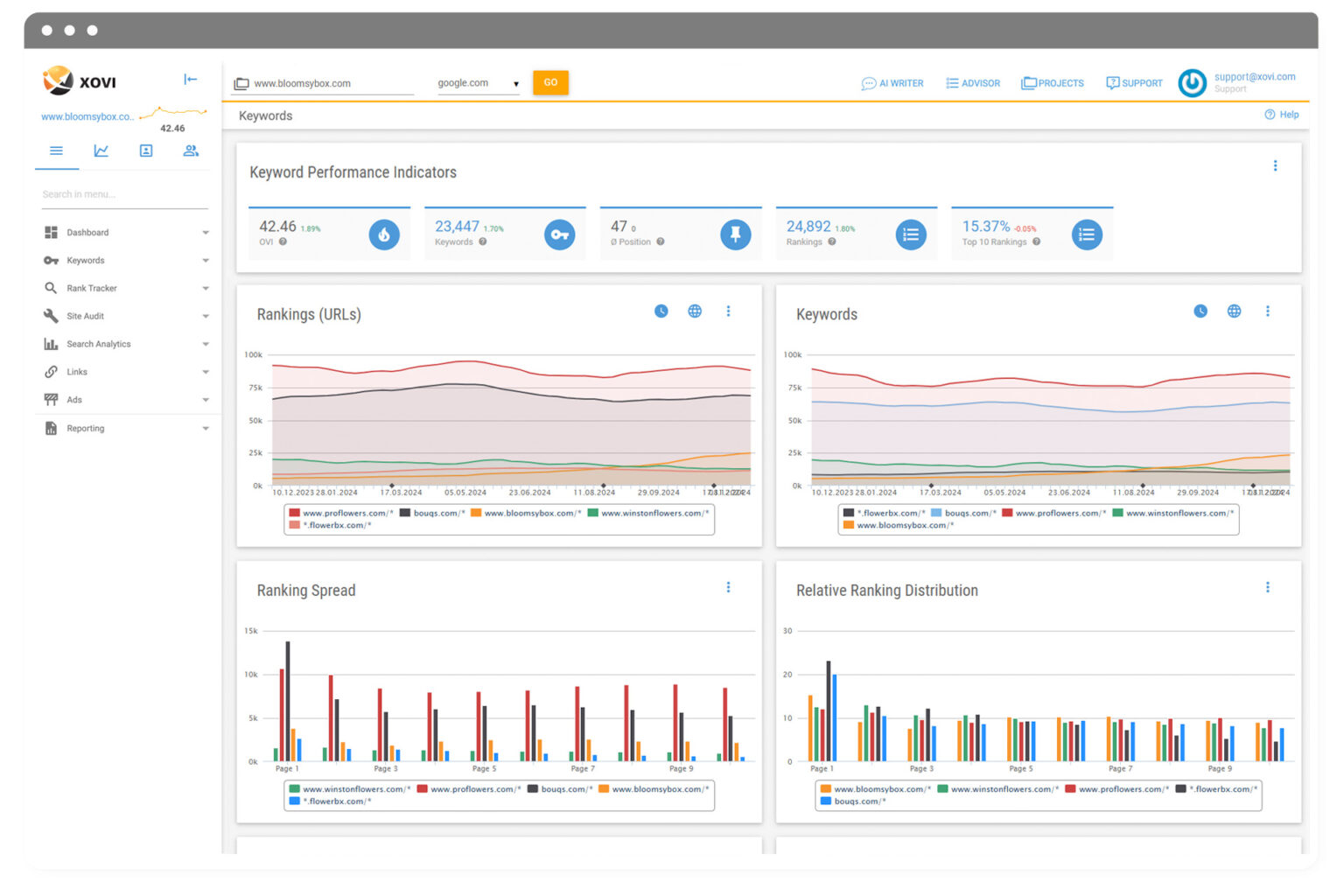
You can run unlimited site audits and get detailed reports to find issues and measure your progress. Whether you're managing one website or several, XOVI gives you what you need to grow your online reach.
Features
- Keywords: Use helpful information such as search traffic and competition to identify valuable keywords. Save your favorites in a keyword planner and see which terms bring traffic to you and your competitors.
- Site audit: Check your site for technical problems and content issues that could hurt your rankings. Get tips to improve your text so it's more relevant and search-friendly.
- Rank tracker: Track how your important keywords are ranking across different devices. Stay updated on changes so you can quickly respond if your position drops.
- Backlinks: Examine the websites that link to yours and contrast your backlink profile with those of your competitors. Use this insight to build stronger and more trustworthy links.
- Toxic link removal: Look for bad backlinks that might affect your rankings. To lower the possibility of penalties, create a disavow file to submit to Google.
- Custom reports: Build professional SEO reports tailored to your brand. Perfect for sharing clear results with clients, managers, or team members.
- Search analytics: Connect with tools like Google Analytics, Google Search Console, or Matomo to access all your search data in one place for easier analysis.
- Search engine ads: Explore how your competitors run Google Ads, including what keywords they're targeting and which strategies seem to work best.
- Advisor: Get a list of personalized SEO tasks with simple instructions. Great for anyone who wants to improve their rankings without needing to be an expert.
- AI writer: Use AI to create content that's optimized for search engines. It helps you write better, faster, and increases your chances of showing up in search results.
- It offers enough SEO tools to be the only tool you need to rank in the SERP.
- Gives access to unlimited projects and competitor analyses on all plans.
- Has the option of white-label reports customizable for your brand for agencies that need professional client reporting.
- Not as many third-party integrations as other tools.
- Starts at EUR 99.00/month. Offers a 14-day free trial.
2. Semrush - SEO Tool
Semrush is a well-liked all-in-one marketing tool created to assist companies in expanding their internet visibility. It's best known for its SEO features, but it also supports content marketing, advertising, social media, and competitor analysis. 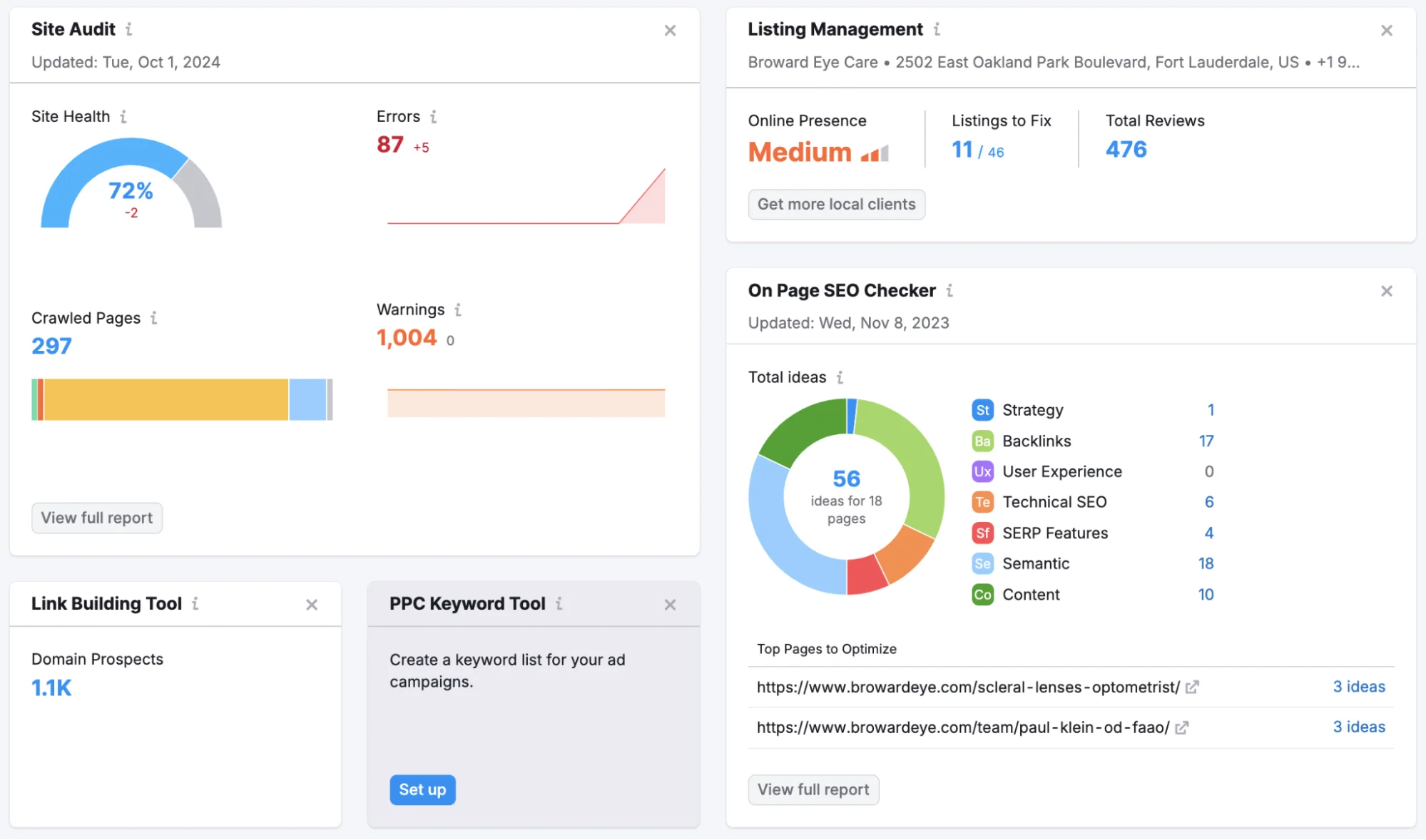
You can use Semrush to conduct keyword research, monitor your rankings, learn about the actions of your competitors, and increase the search engine exposure of your website.
It brings together a wide range of tools in one platform, making it easier to plan and manage your digital marketing efforts.
Features
- Keyword research: Find the best keywords to increase traffic to your website.
- On-page SEO: Learn how to improve your website health and your SEO strategy with site audits and data-based recommendations.
- Local SEO: Build a local customer base more easily by optimizing your site to appear in searches in your area.
- Rank tracking: Monitor location-based changes of your keywords.
- Link building: Discover strong backlink opportunities, monitor competitors' backlink profiles, and clean your own to avoid penalties.
- Competitor SEO analysis: Keep an eye on competitor strategies and learn from their content and keywords.
- Offers a free plan with cool features.
- You can customize the dashboard for your needs.
- Its functionalities work great at the enterprise level.
- Paid plans are pretty expensive.
- Offers a suite of free SEO tools. Paid plans start at $139.95/month.
3. Ahrefs - SEO Tool
Ahrefs is an SEO tool that helps you raise your website's search engine ranking. It is frequently used for content planning, backlink analysis, keyword research, and monitoring your site's ranking over time. 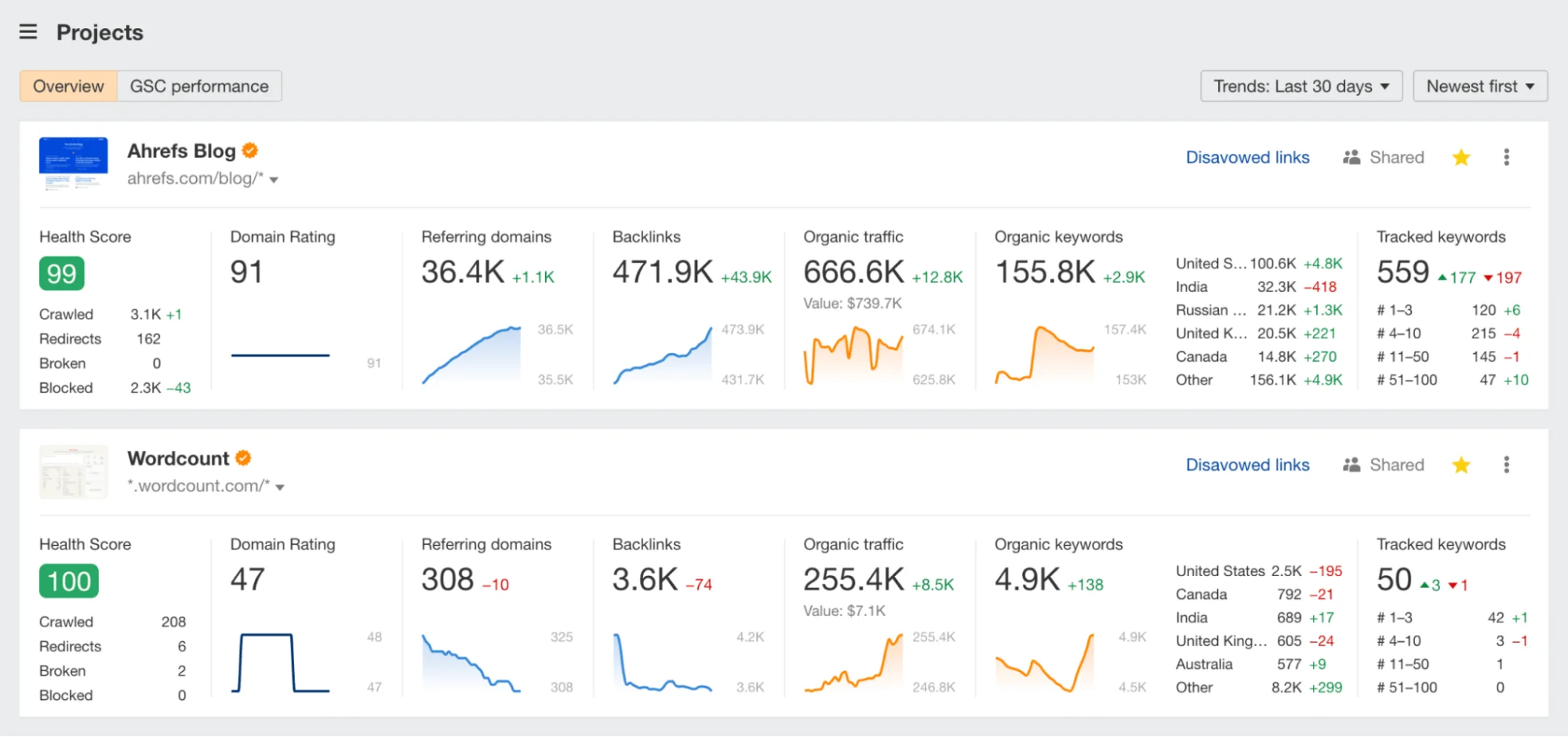
One of its strengths is showing which websites link to yours and to your competitors, helping you build a stronger online presence. Whether you're trying to get more traffic, find content ideas, or see what's working in your industry, Ahrefs gives you the data you need in a clear, easy-to-use format.
Features
- Site explorer: See what's working on your competitors' websites, including their top pages and backlinks.
- Keywords explorer: You can use the appropriate keywords in your article by learning what people are searching for.
- Rank tracker: Monitor your website's position in search results and note any changes over time.
- Web explorer: Search through all publicly indexed pages and links to discover new insights.
- Site audit: Check your website for technical problems and receive recommendations on how to improve its search engine optimization.
- Web analytics: Recognize the sources of your website traffic and the ways in which users engage with it.
- Content explorer: Find mentions of your brand or topics you care about, and discover websites that might link to your content.
- AI content helper: Use AI tools to improve your writing and make your content more effective for SEO.
- Ranking data is always up-to-date.
- They offer a free AI paraphrasing tool.
- It's easy to use, even for beginners.
- Not an all-in-one SEO tool, as it doesn't have certain functionalities like local SEO, for example.
- The free keyword generator no longer gives you clear difficulty scores and volume numbers.
- Offers a suite of free SEO tools. Paid plans start at $129/month.
4. AnswerThePublic - Keyword Research Tool
AnswerThePublic is a tool for researching keywords that helps you find out what people are actually looking for online. 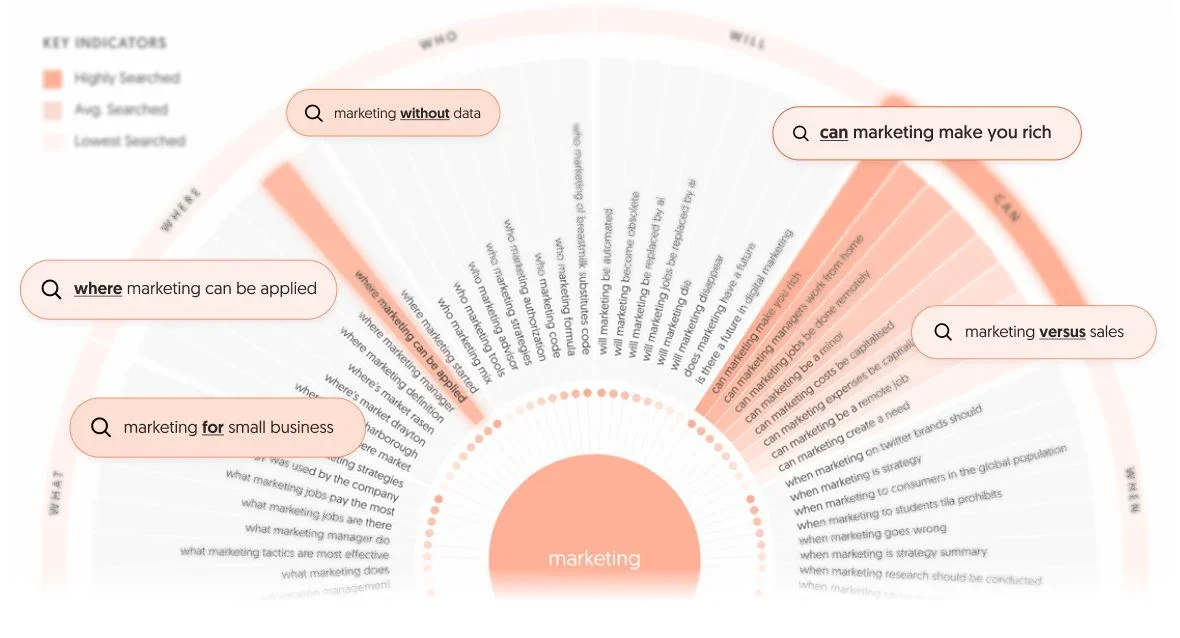
When you type in a topic, it shows you related questions, phrases, and comparisons that people commonly ask, like "how does it work?" or "best tools for..." It presents this data in unique visual formats (like a search wheel), making it easy to spot patterns and user intent.
Unlike more technical tools that focus on things like keyword difficulty and cost-per-click, AnswerThePublic gives you insights that feel closer to what your audience actually wants to know. You can explore long-tail keywords, organize your research into projects, track trends over time, and even set alerts for new search behavior.
Features
- Keyword search: Enter topics to discover related search queries and ideas.
- Keyword search volume: View how often people search for specific keywords.
- Cost per click data: See how competitive each keyword is for paid ads.
- Organize results with tags: Group and label keyword ideas to stay organized.
- Search listening alerts: Get notified when new search trends appear for your topics.
- Export CSV: Download your keyword data as spreadsheet files.
- Download images: Save high-resolution visual keyword maps.
- Compare data over time: Track how keyword interest changes.
- Hide branches & suggestions: Remove irrelevant keyword ideas to clean up your results.
- It's especially useful for bloggers, content creators, and marketers who want to create helpful content based on real user questions.
- Offers affordable lifetime plans.
- Visualizations make it easy to understand the data.
- The free tool doesn't give much information on search volume and cost-per-click.
- Offers a free tool. Paid plans start at $6/month.
5. HubSpot - SEO Tool
HubSpot offers SEO tools designed to help you improve your search rankings, create a smart content strategy, and track the results, all in one place. 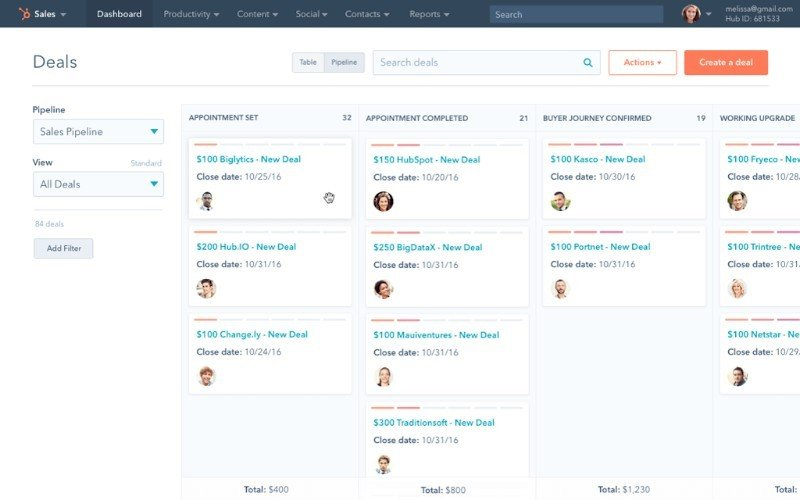
It gives you step-by-step recommendations for optimizing your website, helps you plan content around high-impact topics, and shows how your SEO efforts are paying off. Since it's built into HubSpot's content tools, you can optimize blog posts, landing pages, and website content directly while you create them, no coding required.
Features
- SEO recommendations: Get prioritized tips for improving your pages and boosting rankings.
- Content strategy planning: Discover topic ideas based on relevance and search potential, then build content around them.
- Search keyword data: See how keywords perform and estimate potential traffic gains.
- Canonical URL selection: Choose preferred URLs to avoid duplicate content issues.
- Search analytics: Track impressions, clicks, and ranking progress over time.
- Google Search Console integration: Pull in real search data to guide your SEO strategy.
- Performance reporting: View detailed reports on content rankings and keyword success.
- Content optimization tools: Optimize blog posts, landing pages, and more from within the HubSpot platform.
- CMS integration: Use SEO tools alongside HubSpot's drag-and-drop website builder.
- Easy to integrate your SEO efforts with all your other marketing plans.
- It's beginner-friendly.
- Not as comprehensive as dedicated SEO tools.
- Advanced SEO features come with a very expensive plan.
- There's a free plan with basic SEO recommendations. More advanced SEO features come with the Marketing Hub Professional plan at $880/month.
6. BuzzSumo - Analytics Tool
BuzzSumo is a content and keyword research tool that helps you discover popular topics, analyze search trends, and create high-performing content. Unlike basic keyword tools, BuzzSumo gives you detailed insights into what content is getting attention online across search engines, social media, and competitor sites. 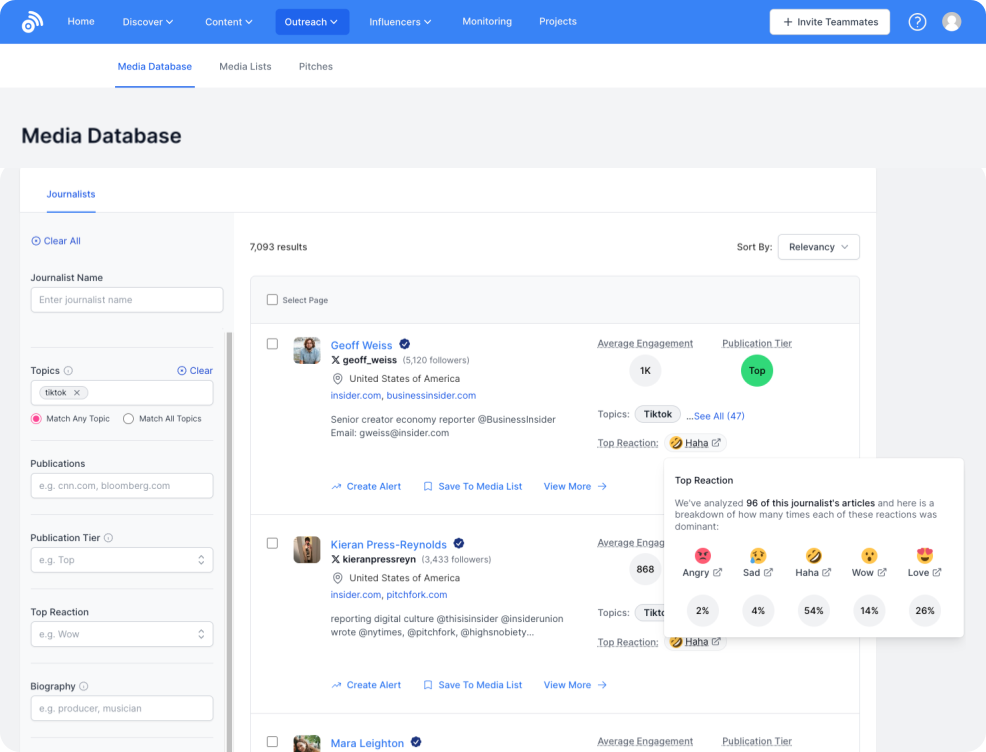
From keyword volume and article ideas to influencer discovery and content briefs, it's a go-to tool for content marketers looking to create engaging, shareable content backed by data.
Features
- Content discovery: Find trending topics and popular content in your niche to inspire blog posts, landing pages, or evergreen articles. This helps you create SEO-friendly content that matches current user interests.
- Content research: Analyze the top-performing content for any topic or keyword. See which headlines, formats, and lengths perform best, and use this to shape content that ranks well in search engines.
- Keyword tool: Explore keyword suggestions with related search volume data, CPC, and competition insights. You can also view how many articles have already been published around a keyword to spot gaps or opportunities.
- Content analyzer: Check how content performs in terms of engagement and backlinks. This helps you understand what makes content successful and improves your own content planning and link-building strategy.
- Monitoring: Set up alerts for brand names, keywords, competitors, or backlinks. This helps you track mentions and uncover potential backlink opportunities or content gaps worth targeting.
- Very useful for content creators who need article ideas.
- User-friendly interface.
- It offers a month-long free trial which gives you enough time to try the tool out.
- Pricey and has no free SEO tools.
- Since it's not a dedicated SEO tool, it's not as comprehensive as competitors like XOVI or Semrush.
- The Content Creation plan is $199/month. It offers a 30-day free trial.
7. SurferSEO - SEO Tool
SurferSEO is a tool that helps you create content that ranks better on search engines like Google. It analyzes the top pages for your keyword and gives real-time suggestions as you write, like how long your content should be, what keywords to include, and how to structure your headings. 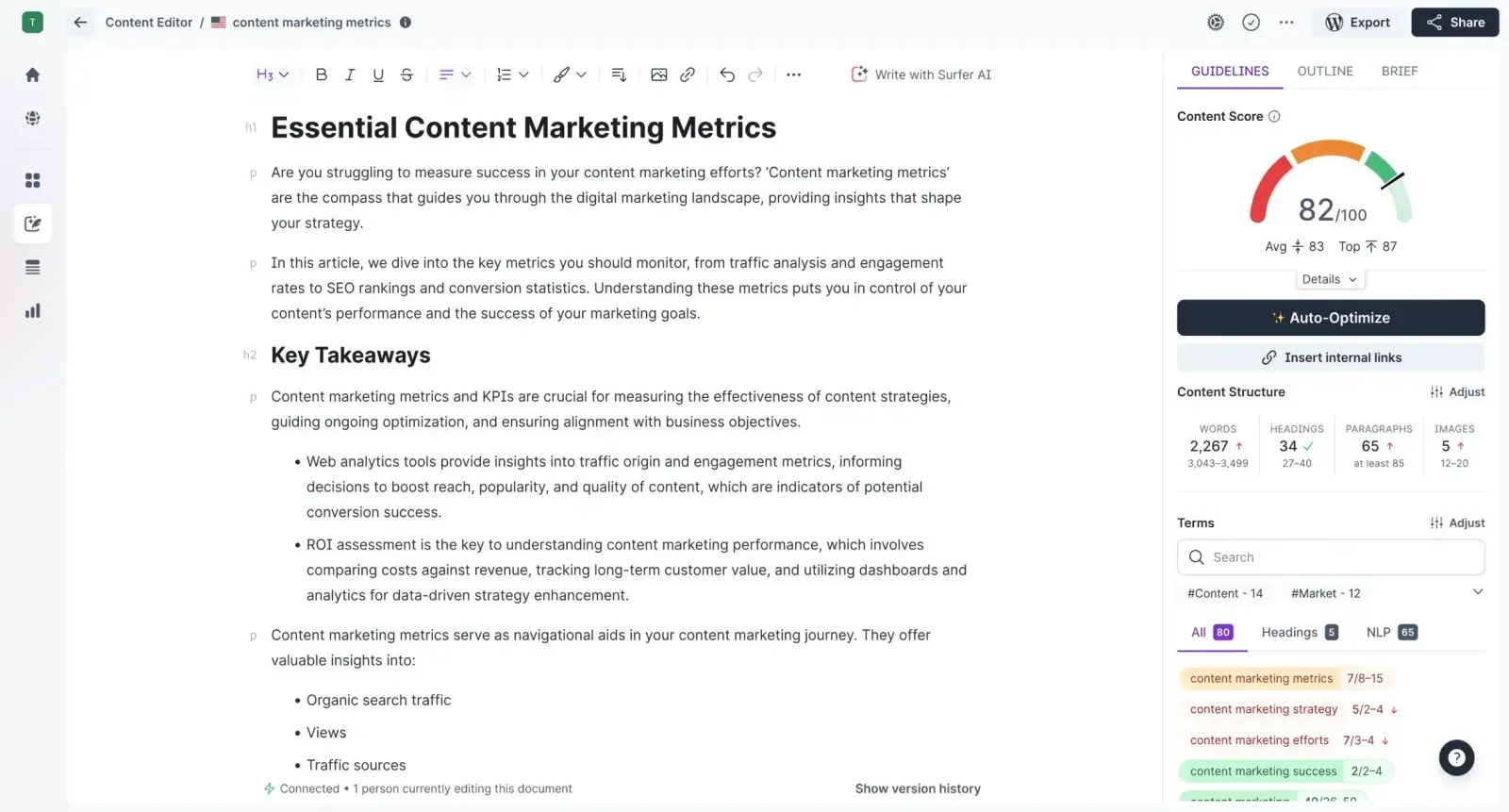
Besides content optimization, Surfer also offers keyword research tools, content planning based on topic clusters, and audit features to improve existing pages. It even integrates with platforms like Google Docs and WordPress.
Features
- Topical maps: Discover content ideas around a main topic and organize them to cover your niche more completely.
- Content editor: Get real-time writing suggestions based on top-ranking pages, including word count, keywords, and structure.
- Content audit: Analyze existing pages and get tips to improve rankings by fixing content gaps or optimization issues.
- Surfer AI: Instantly generate SEO-optimized articles with just one click, ready to publish.
- AI outline generator: Make well-organized content outlines that are optimized for search engines and those who read it.
- AI detector: Check if your content sounds like it was written by AI and adjust it if needed.
- AI humanizer: Rewrite text produced by AI to make it sound more human and natural.
- Chrome extension: View search volume and keyword recommendations straight from Google Search results, and use ChatGPT's AI Humanizer. You can also use the Content Editor directly in your document with the extension.
- Audit reports are detailed and give recommendations that are easy to implement.
- The UI is modern and user-friendly.
- Offers some amazing free tools like the AI detector and humanizer.
- Surfer AI is charged by article, adding up to a pretty high price.
- Starts at $99/month.
8. SEOquake - SEO Tool
SEOquake is one of the best free SEO tools out there, and it has no paid plans or features. It's a browser extension that gives you instant access to SEO data for any webpage you visit. With just one click, you can audit on-page elements, check keyword usage, analyze internal and external links, and compare domains, all without leaving your browser. 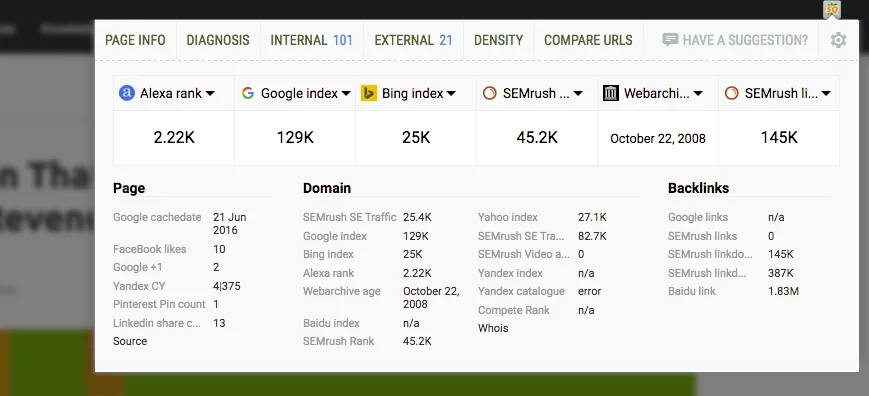
It's fast, lightweight, and ideal for marketers, SEO beginners, and web developers who want to get a quick overview of a page's SEO performance. Whether you're doing competitor research, checking your own site, or analyzing search results, SEOquake helps you make smarter decisions by showing key metrics in real time.
Features
- On-page SEO audit: Instantly check SEO elements like meta tags, headings, and keyword use.
- Link examiner: View all internal and external links on a page, including anchor text and link types.
- Domain and URL comparison: Compare multiple websites or pages side by side using key SEO metrics.
- SEObar: See a quick SEO summary directly in your browser toolbar while you browse.
- SEO dashboard: Open a pop-up window with detailed page and domain data, including backlinks.
- SERP overlay: Add SEO data directly into Google search results and export them if needed.
- Keyword analysis: Get a list of all keywords used on a page, plus a visual keyword cloud.
- Multiple data sources: Access metrics from Semrush, Alexa, Google, Yahoo, and social media platforms.
- Print and export: Save or print SEO reports in CSV format with just a few clicks.
- Custom display settings: Choose which data to show or hide, so you only see what you need.
- It's completely free.
- You don't need to switch between tabs to get the data you need.
- Since it's browser-only, it has no content writing and optimization features.
- It takes a while to learn how to use it.
- Free.
9. Exploding Topics - Trend Discovery Tool
Exploding Topics is a trend discovery tool that helps you find fast-growing topics before they become widely known. It scans data from millions of online sources like search engines, news sites, and forums, to spot early signs of rising interest. 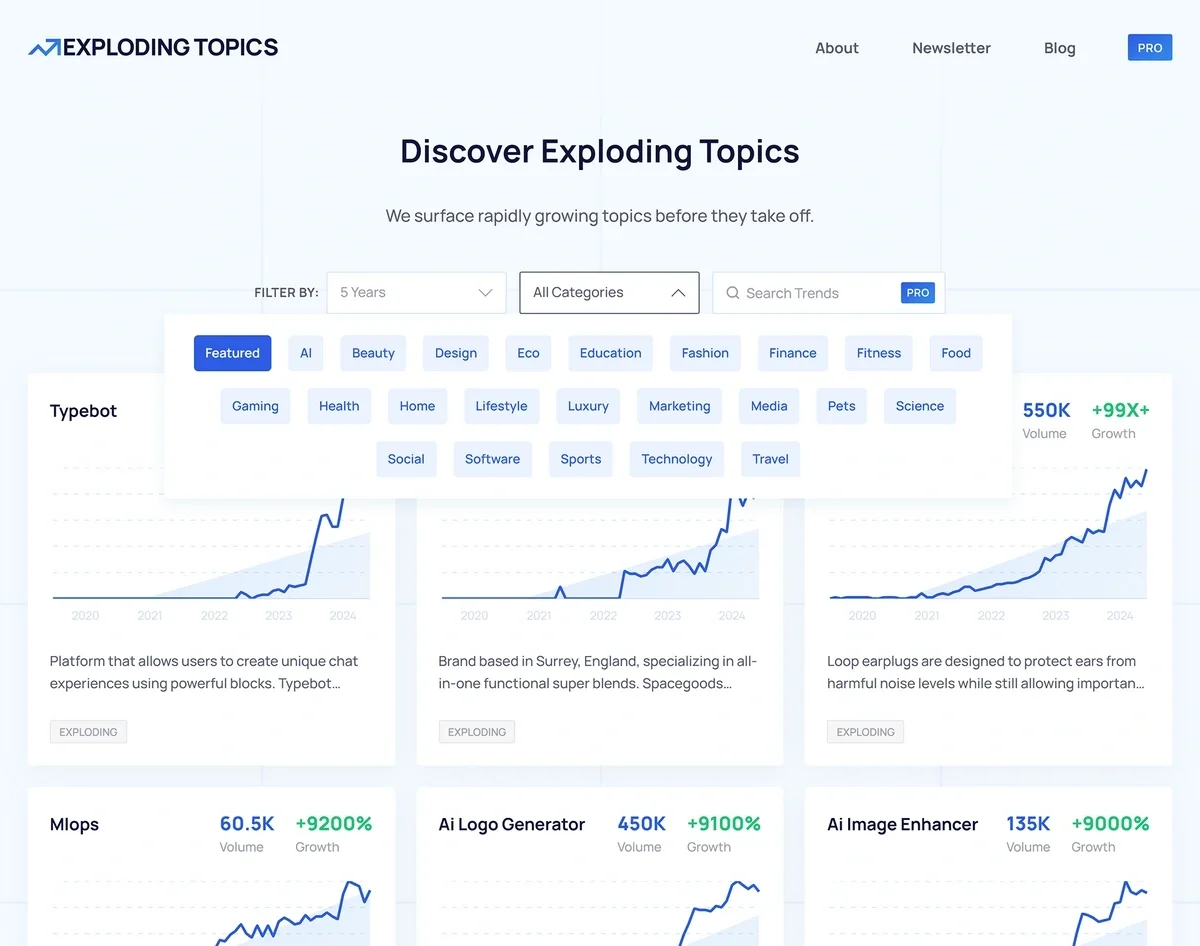
You can explore trending topics by industry, filter by time range, and track how interest changes over weeks or months. With the Pro version, you can access a growing trend database, receive weekly trend reports, save topics to your dashboard, and get alerts on newly emerging trends.
It's ideal for marketers, content creators, startups, and businesses looking to stay ahead of trends and build strategies around what's gaining traction.
Features
- Trend discovery: Search for and explore trending topics based on real-time growth across the internet.
- Trend graphs: View visual charts showing how interest in a topic has increased over time.
- Category browsing: Explore trending topics by industry or niche, like health, marketing, tech, or fashion.
- Weekly trend reports: Get curated lists of trending topics delivered to your inbox every week.
- Emerging trend alerts: Get early warnings about new topics that are starting to grow fast.
- Keyword research: Find the words and phrases people are searching for so you can create content that matches their interests and gets more traffic.
- Backlink checker: See which websites are linking to yours or your competitors' pages to understand your site's authority and discover new link-building opportunities.
- SERP checker: Analyze what shows up on Google's search results page for a specific keyword, including featured snippets, top-ranking pages, and other elements.
- Keyword rank checker: Track where your website ranks in search results for specific keywords and monitor changes over time.
- Its free SEO tools give valuable insights.
- The tools are beginner-friendly.
- The free keyword ranking data you get is much more comprehensive compared to other free tools such as Ahrefs.
- To get full use of the free tools you need to create a free Semrush account.
- Offers free tools. Paid plans start at $39/month.
10. Ubersuggest - SEO Tool
Ubersuggest is a free SEO tool that helps you grow your website traffic by giving you insights into keywords, content, and your competition. You can enter a keyword or website and instantly see search traffic, keyword difficulty, and related keyword ideas. 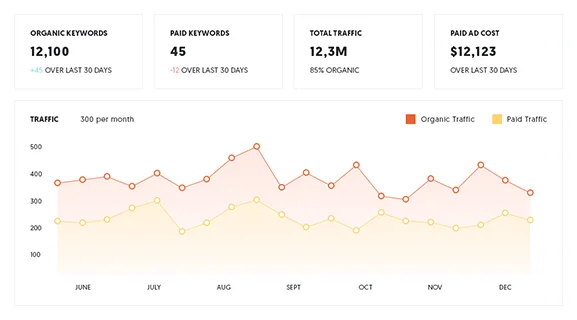
It also shows you which content is ranking well for your target terms and what backlinks those pages have. Ubersuggest includes a site audit feature that checks your website for SEO issues and gives suggestions to fix them.
You can also track your keyword rankings over time, making it a useful tool for planning and improving your SEO strategy.
Features
- Keyword research: Discover keyword ideas along with search volume, SEO difficulty, paid difficulty, and CPC.
- Site audit: Scan your website for SEO issues like broken links, slow loading speed, or missing metadata.
- Rank tracking: Monitor your website's rankings for specific keywords and track changes over time.
- Content ideas: Get suggestions for blog topics based on what's performing well for your keywords.
- Backlink data: See which sites are linking to yours or your competitors and evaluate link strength.
- Traffic analyzer: Estimate how much traffic a website gets and what keywords are bringing it in.
- Chrome extension: View keyword and domain metrics while browsing Google search results.
- Competitor analysis: Enter a competitor's domain to uncover their top-performing content, keywords, and backlinks.
- SEO training & resources: Access educational materials and video tutorials to help you learn SEO as you go.
- Lots of great free features.
- Can use free tools even without an account.
- Affordable paid plans.
- Free version has daily usage caps unless you upgrade.
- Some users report less accurate traffic estimates and backlink data compared to higher-end tools.
- Offers a free plan. Paid plans start at $20/month.
Frequently Asked Questions
1. How to Use SEO Tools Effectively for Higher Website Ranking?
To use SEO tools effectively to rank higher in organic search results, use the data they give you and the recommendations they make to improve keyword density, content formatting, technical website issues, backlink strategies, and more. 2. What Are the Best SEO Tools for Beginners?
The best tools for beginners are easy to use, offer clear keyword suggestions, simple audits, and provide content tips without overwhelming features. A few examples are XOVI, Ubersuggest, and SurferSEO. 3. What Are the Best Tools for SEO Reports?
Some of the best tools for SEO reports are Semrush, Ahrefs, and HubSpot, as they offer detailed SEO reports with keyword rankings, backlink data, and site health insights for clients or internal use. 4. Which Are the Essential SEO Tools Every Marketer Should Use?
Essential SEO tools that every marketer should use offer: - Site health analysis
- Keyword research
- Rank tracking
- Competitor analysis
- Backlink tracking
- Content optimization suggestions
- SEO reporting
- Local SEO tools
- On-page SEO analysis
- Integration with other tools
5. What Are Backlinks In SEO?
Backlinks are links from other websites to yours. They help improve your site's authority and search engine rankings when they come from trusted sources. Improve Your Website Traffic With The Best SEO Software
Now that you know how some of the best free and paid SEO tools out there work, it's time to decide which ones you want to use in your marketing strategy. Whichever one you select, be sure it provides you with an in-depth understanding of what is and is not working for you and your competitors. Higher SERP ranks and more organic visitors are just one SEO tool away!