Web design & template sales are a large part of the hosting industry. As much as your client needs a domain name & server space to be seen online, they also want to be seen in style. In this article, I'm going to discuss the advantages of using WHMCS with cPanel & WHM to automate the tasks of template & web design, coupled with Web Hosting & Domain Name sales for automation and up-sale potential.
Website templates have always been popular. They are a great entry point for individuals venturing into the wide world of websites. While selling the Web Hosting, Domain Name, and template is up to you, using the cPanel Skeleton Directory can bridge the gap between WHMCS' Account, Billing, and Domain Registration Automation and manually deploying your new customers' selected template.
The cPanel Skeleton Directory is a folder in which you can place a limitless amount of files that will automatically be deployed into the document root of any account that is created by the owner of the Skeleton Directory. While this is available for the root user and all resellers, for template deployment I highly recommend using individual Reseller Accounts for each template (if applicable).
Let's take for example that I have four templates, each geared at a specific audience. One is a generic template with a standard theme, another is geared towards eCommerce, the third focuses on the food critic, and the fourth aims at the blogging user. My first step is creating four individual Reseller Accounts on my cPanel/WHM Server. For organizational & display purposes, I'm naming these Resellers "blogger," "general," "ecom," and "food." I now have four individual Skeleton Directories within each of these accounts. The folder path to them on the server would be:
/home/blogger/cpanel3-skel/public_html
/home/general/cpanel3-skel/public_html
/home/ecom/cpanel3-skel/public_html
/home/food/cpanel3-skel/public_html
The full documentation regarding the Skeleton Directory can be found here:
https://go.cpanel.net/skeletondirectory
I'll take each respective template and upload it to the aforementioned folders. Now, any time one of those resellers creates an account the files within the Skeleton Directory will be automatically deployed into my clients DocumentRoot - ready for them to begin using.
The second step will be setting up the products within my WHMCS. This is a straightforward process taking a few clicks within Setup >> Products Services, followed by setting up specific Server Groups & Servers with the respected Reseller Login information to ensure that deployment of my templates is performed correctly. Our documentation regarding these two sections can be found here:
https://docs.whmcs.com/Servershttps://docs.whmcs.com/Products_and_Services
The final step is the ordering process. I need to gear my order form to sell templates. I decided on using the Modern Cart template provided by WHMCS as it best suited the format I had in my head. Here's how I plotted it out:
I knew I wanted to shrink the width of the pre-set boxes to closely fit my templates images, so I made the below change to style.css for the products class:
./templates/orderforms/modern/style.css
#order-modern .products {
float: left;
margin: 0;
width: 25%;
}
Next, I needed a way to associate an image with a product, rather than its name. Using Firebug, I found what class was being called and then found the file, which was products.tpl. Finally I took the smarty template usage and replaced it calling product.name for an image tag. I then associated it with the product.pid, naming my images accordingly on the server.
./templates/orderforms/modern/products.tpl
{$groupname}
{foreach from=$products key=num item=product} 
Here is the end result: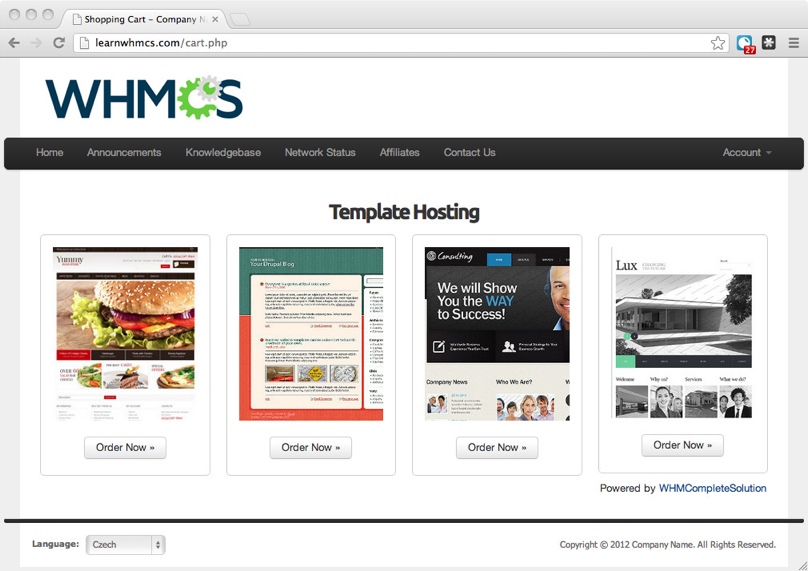
I am now ready to sell an all inclusive Template, Domain Registration, and Hosting service to prospective clients.
Harnessing the power behind the WHMCS software and cPanel & WHM is easy, and we're here to show you how. If you have any questions or comments about using WHMCS in a non-conventional way, or want to share how you're harnessing the power of WHMCS, please feel free to drop us a line!
Template images provided by Template Monster
Recommended Articles
The Best Free & Paid SEO Tools for Your Website
June 3rd, 2026
How To: Offer OpenClaw Hosting with WHMCS + SolusVM
April 30th, 2026
10 Best Digital Marketing Tools for Small Business
January 30th, 2026