Every checkout has a moment when a customer hesitates.
Maybe the payment method they expect isn't available. Maybe the form asks for too many fields. Maybe it's a repeat purchase that still feels like filling out a first-time checkout.
Small moments of friction like these can cause customers to abandon payments before completing them.
That's why we're introducing Stripe Dynamic Payments for WHMCS.
Stripe Dynamic Payments brings Stripe's latest checkout technology directly into WHMCS, helping businesses deliver a faster, smarter payment experience with minimal setup. With dynamic payment methods and Link autofill for returning customers, Stripe Dynamic Payments is designed to reduce checkout friction and help customers complete payments faster.
It's now the recommended Stripe gateway moving forward for WHMCS, providing a modern checkout experience that works seamlessly across devices and payment methods.
Why Checkout Friction Matters
Your checkout experience has a direct impact on revenue. Even small barriers during payment can lead to abandoned transactions, lost customers, and reduced conversion rates. Customers expect checkout to be fast, flexible, and effortless, especially when they've already purchased from you before.
But traditional payment flows often create unnecessary friction:
- Customers don't always see their preferred payment method
- Returning customers must repeatedly enter payment details
- Merchants need to manually configure or maintain multiple payment options
- Checkout flows aren't always optimized for speed or completion
Instead of managing multiple integrations or manually configuring payment options, Stripe Dynamic Payments intelligently adapts the checkout experience based on the customer.
The result is a smoother payment process, less configuration work for administrators, and a checkout experience designed for completion.
What's New in Stripe Dynamic Payments
Stripe Dynamic Payments introduces several improvements that focus on reducing friction at the exact moments it typically appears during payment. Below are the core capabilities included in the new module.
Dynamic Payment Methods
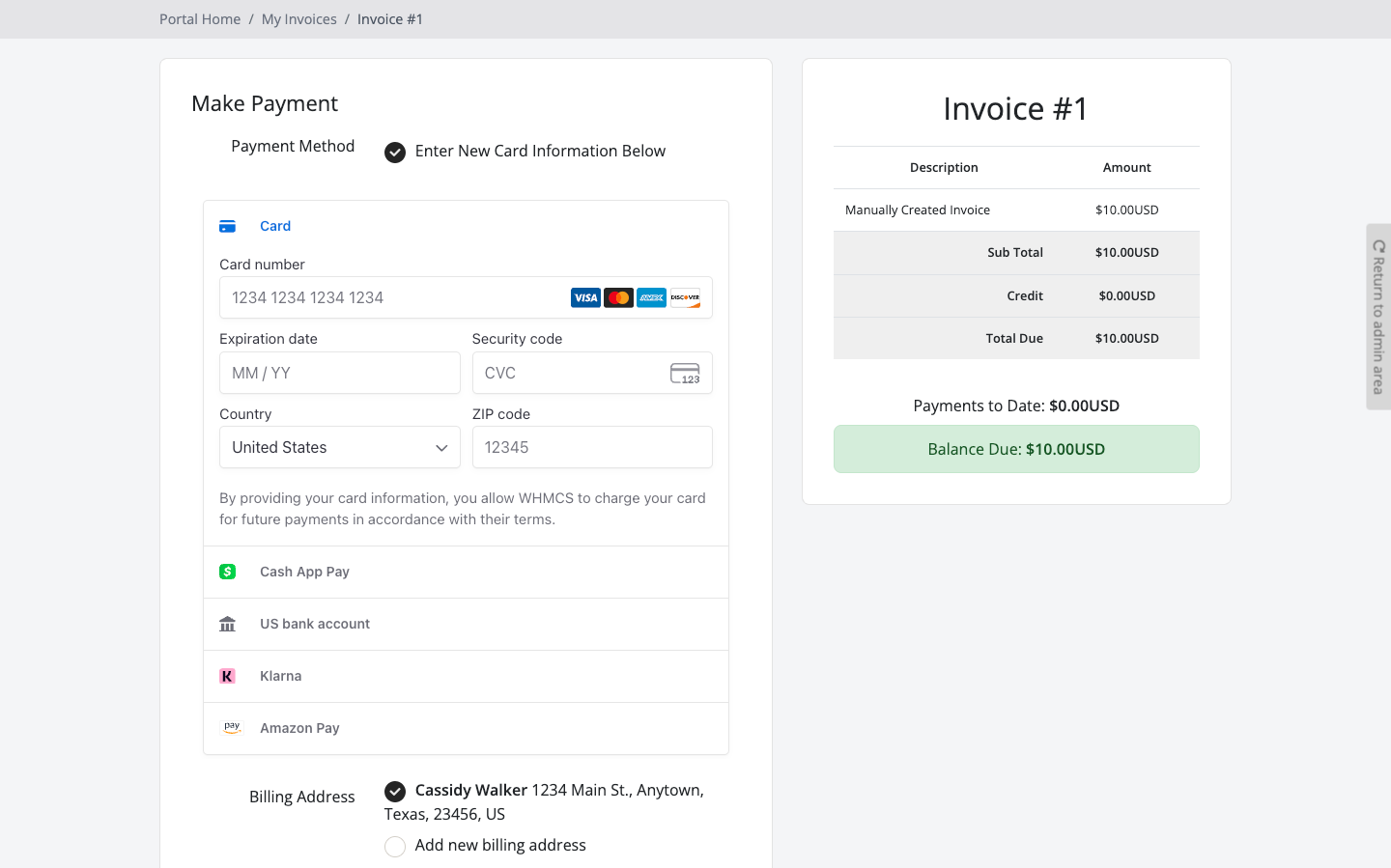
Stripe Dynamic Payments automatically displays the most relevant payment methods for each customer based on factors like location, currency, and device. This means customers see the payment options they are most likely to use without merchants needing to manually configure or maintain additional payment integrations.
Instead of building and managing multiple payment modules, Stripe Dynamic Payments dynamically surfaces the payment methods already enabled in your Stripe account.
Benefits include:
- Customers see relevant payment methods automatically
- Fewer configuration steps for admins
- Improved checkout completion rates
- Automatic support for Stripe-enabled payment methods
Link Autofill for Faster Repeat Checkout
Returning customers should never feel like they're checking out for the first time. Stripe's Link accelerated checkout allows customers to securely save their payment information so they can complete future purchases instantly.
With Link autofill enabled, returning users can:
- Pay with saved payment information
- Skip re-entering card details and billing fields
- Complete checkout significantly faster
The result is a checkout experience that feels fast, familiar, and effortless.
Built on Stripe Checkout and Elements
Stripe Dynamic Payments works seamlessly with Stripe Elements, providing a modern payment infrastructure designed for performance and reliability. This means your WHMCS checkout benefits from Stripe's continuously improving payment technology, including:
- Optimized payment UI components
- Secure payment handling
- Responsive checkout experiences across desktop and mobile
Built for WHMCS Admins and Teams
Stripe Dynamic Payments was designed to benefit both WHMCS administrators and technical teams responsible for maintaining billing systems. For WHMCS Admins
Stripe Dynamic Payments provides a more flexible checkout experience with minimal setup.
Admins can offer customers more payment options and a faster checkout flow without needing to manage multiple payment integrations.
Key advantages include:
- Dynamic payment methods shown automatically
- Faster checkout for returning customers
- Minimal setup and configuration
- Reduced payment friction during checkout
For Engineering Teams
For teams responsible for maintaining billing infrastructure, Stripe Dynamic Payments simplifies the payment stack.
Instead of maintaining separate payment method logic or integrations over time, the checkout experience relies on a single optimized Stripe integration that dynamically adapts to customer context.
This reduces ongoing maintenance while allowing Stripe's payment infrastructure to handle the complexity of payment method availability and optimization.
How to Activate Stripe Dynamic Payments
Getting started with Stripe Dynamic Payments takes only a few minutes. Step 1: Activate the Stripe Dynamic Payments ModuleLog in to your WHMCS admin area and navigate to Payment Methods. Activate the Stripe Dynamic Payments gateway module.
Step 2: Connect Your Stripe AccountSecurely connect your Stripe account using your API keys to enable payment processing through Stripe.
Step 3: Enable and Review Payment MethodsEnsure your desired payment methods are enabled within your Stripe account. Stripe Dynamic Payments will automatically display eligible options for customers during checkout.
Step 4: Run a Test TransactionComplete a test payment to confirm the gateway is configured correctly and working as expected.
Step 5: Go LiveOnce verified, your WHMCS instance is ready to start accepting payments through Stripe Dynamic Payments.
Is Stripe Dynamic Payments Right for You?
If you already accept Stripe payments in WHMCS, Stripe Dynamic Payments is the most direct upgrade path to a faster and more modern checkout experience. For new Stripe integrations, Stripe Dynamic Payments is the recommended Stripe gateway moving forward, designed to provide a better payment experience with minimal setup.
And because Stripe Dynamic Payments connects directly to your existing Stripe account, you can start benefiting from dynamic payment methods and Link autofill without changing your underlying payment infrastructure.
Start Accepting Faster Payments Today
Stripe Dynamic Payments brings Stripe's modern payment technology directly into WHMCS, helping businesses reduce checkout friction and deliver a faster way for customers to pay. With dynamic payment methods, accelerated checkout for returning customers, and minimal configuration, Stripe Dynamic Payments provides a smarter payment experience for both merchants and customers.
If you're using Stripe today, or planning to start, this is the easiest way to deliver a more optimized checkout experience in WHMCS.
Activate Stripe Dynamic Payments today and start delivering faster, smarter payments.
Activate Stripe Dynamic Payments - More Info Here.